Getting Things Done in one outline instead of five apps
by Andreas Tissen · · updated
On Sunday evening you try to list what you promised this week. Dana called about the venue and you said you would call back. Legal said on Tuesday that the contract draft was coming. The front page of the new website still needs its copy. The call is noted in an app on your phone, the promise from legal is somewhere in your mail, and the website copy is in a task app.
That is the situation David Allen wrote Getting Things Done for, first published in 2001 and revised in 2015. If you have tried GTD with a handful of apps and given up after a few weeks, here is the method in enough detail to use anywhere, and a way to keep all of it in one place.
Capture, clarify, organise, reflect, engage
Allen's revised edition has five steps, in this order.
Capture means that everything which has your attention goes into one inbox, the moment you notice it. Clarify means taking each item out of the inbox and deciding what it is: if it needs more than one action it becomes a project, and every project gets exactly one next action you could do today. Organise means putting it where it belongs: Projects, Waiting for (things other people owe you), Someday (ideas you are not committing to), or the calendar if it has a fixed date. Reflect is the weekly review, when you walk all of those lists and bring them up to date. Engage is doing the work, picking from next actions you already trust.
The point of all five is to get commitments out of your head.
Why it stalls between apps
It stalls at the joins between tools. Take the call from Dana. It lands in the notes app on your phone because that was open, and to clarify it you open the task app, find the project for the event, type the next action ("call Dana back about the room size") and go back to delete the note. That is four steps for one capture. Every capture of the week costs the same, so they pile up unclarified.
The weekly review pays the same price. The inbox is in one app, the projects in another, Waiting for in a spreadsheet and Someday in a document you opened twice. After the third skipped Friday the lists are out of date, and once you stop trusting them your head takes the job back.
Five branches of one tree
Pando is the outliner I build: bullets inside bullets, in the browser on a desk and as the same app on the phone, and Claude can read and write in it once you add it as a connector. In an outliner the five lists become five branches of one tree, and a project is a bullet whose children are its actions.
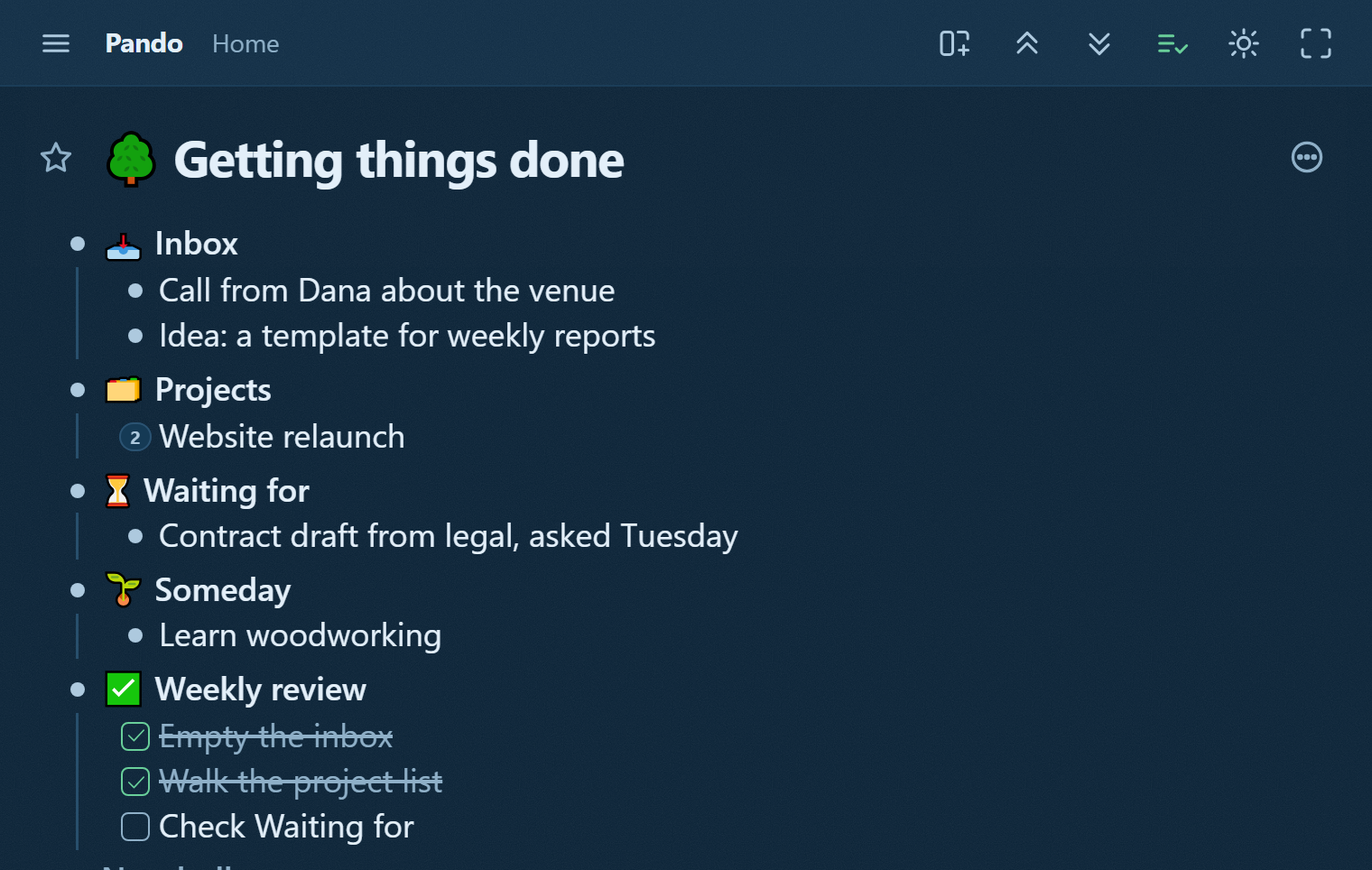
Order carries meaning here. Under "Website relaunch" the open box at the top is the next action and the ticked one below it is finished work. The Weekly review is a checklist whose last step is to untick it, so the same five boxes serve every Friday.
Take Dana again. Clarifying her call is now one drag from Inbox to the event's project, and the words you typed at capture are the words that arrive. A bullet can also have its own email address, which lets you forward a mail straight into the Inbox. The review itself, and how to keep it going past spring, is in the weekly review that survives.
The branch in the picture is the GTD template with one week of examples typed in. The template has placeholder lines where the picture has Dana and the website, 21 bullets in all, and the agent prompt at the bottom.
Claude as the clerk
Connecting takes a few steps in claude.ai or the Claude desktop app: Customize, then Connectors, then Add custom connector, with the name Pando and the address https://pando.ink/mcp. Pando then asks whether Claude may read and write your outline or only read it. MCP is the open standard Claude uses for outside tools, and once the connector is added it works in the Claude app on your phone too.
Two jobs fit GTD. The first is capture: on a walk you tell Claude "put call Dana back about the room size in my GTD inbox", and a bullet with that text appears under Inbox. The second is the dull half of clarifying. With the prompt from the template's agent bullet, Claude reads the Inbox, files each capture under Projects, Waiting for or Someday, writes a next action where one is missing, and leaves a note on anything it was unsure about. It never ticks a box for you. If you would rather approve each move first, ask it to write its proposal as a child bullet instead and do the moving yourself. Claude sees your mail or calendar only if you have connected those as well.
Pando is free up to 5,000 bullets (the whole template is 21 of them), and Pro, with no limit, costs 3 EUR a month. To run GTD in one tree with Claude as the clerk, create a free account and connect Claude.