Give Claude a memory you can read and correct
by Andreas Tissen · · updated
I build Pando, an outliner that Claude can read and write over MCP. The second half of this post shows how it handles memory. The first half is about the memory Claude already has, because it solves part of the problem and you should know which part before you add anything.
Imagine you tell Claude in the phone app that release notes should be one line per change. The next morning Claude Code, in a terminal on your laptop, writes the release notes for the same project with three paragraphs per change. The rule was given to one product, and the work was done by another.
What Claude already remembers
The Claude apps have a memory of their own. Anthropic's help article "Use Claude's chat search and memory to build on previous context" (support.claude.com, read on 14 November 2026) says it is on by default on the web, in Claude Desktop and in the mobile app, and that you can read each saved topic in the settings and edit it. For chat alone, that may be all you need.
Claude Code has two mechanisms, described on Anthropic's page "How Claude remembers your project" (code.claude.com, read on 14 November 2026). CLAUDE.md is a file you write; Claude reads it at the start of every session, and a CLAUDE.md committed to the repository reaches everybody who works on it. Auto memory is what Claude Code writes down itself, and the page is plain about where it lives: "Auto memory is machine-local", and the files "are not shared across machines or cloud environments".
Neither page mentions the other product. A rule you gave Claude on your phone reaches the terminal only if you copy it into CLAUDE.md yourself. If you only ever use Claude Code, on one machine, CLAUDE.md is the right tool and you do not need anything below.
A bullet both of them can reach
Pando runs an MCP server at https://pando.ink/mcp. When you connect Claude to it, the page that asks for your permission has a box labelled "Give it a bullet to remember in", ticked by default.
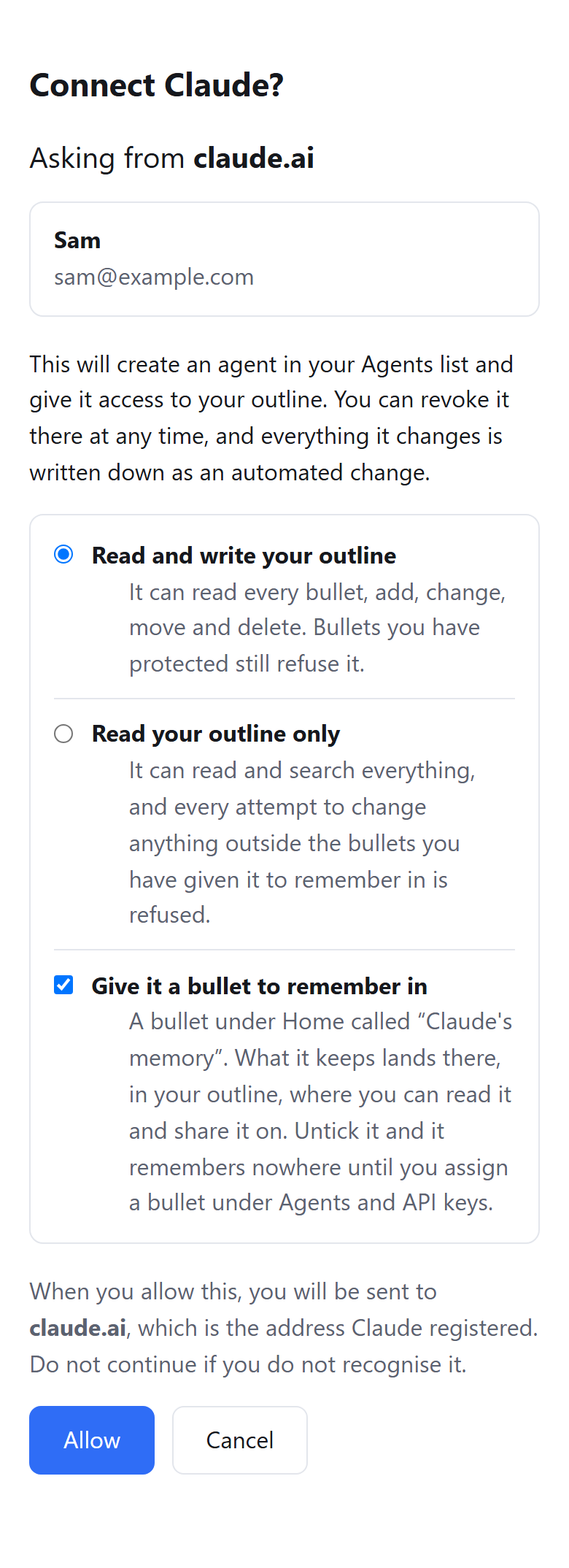
That box creates a bullet under Home called "Claude's memory". Claude writes into it with a tool called remember and searches it with recall. The instructions Pando's server gives every agent ask it to recall before it assumes anything, but that is a request in text, much like a line in CLAUDE.md. Claude decides when to look. Pando does not paste the memory into each chat.
The same server is reachable from claude.ai, the phone app and Claude Code, which is the reason to keep the memory there. A memory bullet is an ordinary bullet in your outline, so you open it, edit a line, move it or share it the way you would any note, at your desk or on the phone.
What is worth writing into it
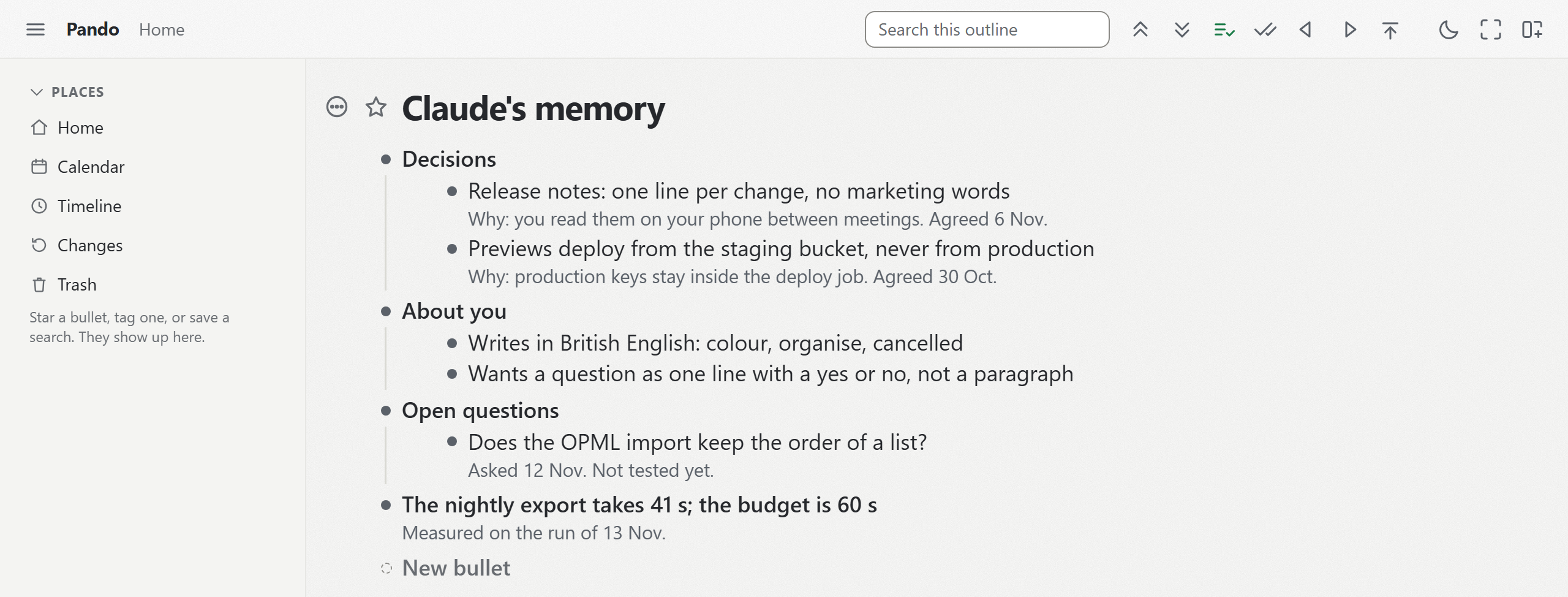
The picture is from a test account. Decisions go in as one line each, with the reason in the note: "Release notes: one line per change", and under it "Why: you read them on your phone between meetings". The assistant that runs my own day keeps every rule I gave it with a line saying why, because a rule without its reason gets applied in places where it does not fit.
Facts about you that change how the agent works belong there too, such as "Wants a question as one line that can be answered yes or no". Open questions belong there as well. Written down, they wait for your answer instead of being settled by whichever session meets them first.
Transcripts are the exception, since re-reading one costs more than it tells you. Keep the decision and its reason.
When a line is wrong
This example is made up. An agent writes down "previews deploy from production" from a conversation in which you were only thinking aloud. If that memory is hidden, every later session acts on the line, and you find out when a preview overwrites something live.
In an outline, the same mistake is a line you can see, in words you can check against what you meant. You change it once. Later sessions start from the corrected line.
Two agents on one memory
For the release notes, connect Claude Code as well, from the same connect page, and point it at the same bullet. Open "Claude's memory", go to Settings and then "Agents and API keys", tap Claude Code's row and press "Remember in", the button that names the bullet you are in. Both agents then write to one memory. A recall from either of them finds the same lines. Two agents, one tree goes further into running two agents side by side.
Limits you should know about
On the consent page you choose whether Claude may change your whole outline or only read it. "Read your outline only" has one exception: Claude may still write into its own memory bullet. A bullet you protect refuses every change from an agent. The changes an agent does make are recorded as automated changes. If one project is all Claude should see, you can hold it to one branch.
The connection stays until you end it with "Remove @claude" under "Agents and API keys"; what Claude wrote stays in your outline. Pando has no end-to-end encryption, its code is not open source, one person builds it, and Pyfio UG in Germany runs it.
Pando is free up to 5,000 bullets, agents included, and Pro removes the limit for 3 EUR a month. Create a free account and connect Claude, then ask Claude what its Pando memory holds; expect an empty bullet the first time.