Take the decisions out of your meeting notes
by Andreas Tissen · · updated
You booked a room for a workshop on a call with the venue. Two weeks later a colleague asks whether it was the big room or the small one, and whether Dana promised the floor plan for this Friday or the next. Somebody took notes, and they sit in a document about that call which nobody has opened since.
The notes were fine. Nobody reads a note about a Wednesday. The method below sorts the lines of a meeting note into four kinds and moves three of them out to where the work is. I show it in Pando, the outliner I built, where the meeting note and your projects are in one outline and moving a line is a drag.
Four kinds of line
Every line in a meeting note is one of four kinds, and the examples here come from the venue call in the picture further down.
- Decided, with the reason: "The big room, 18:00", because the small one caps at 20 people and 26 have signed up. Without the reason, the decision tends to get argued again when somebody suggests the cheaper room.
- Waiting, with a name and a date: "Floor plan from Dana, promised by Friday".
- Next action, as a checkbox with an owner: "Send the deposit, owner me". Every action needs an owner.
- Noise, in a single line: "Parking, catering brands, the story about the last event". It records where the time went, so that nobody later wonders whether the parking question was settled.
During the meeting, type everything as plain bullets and leave the sorting for later, so that you can listen, and in the two minutes afterwards, before the next call starts, go down the list and put the right prefix in front of each line.
Three lines that belong somewhere else
The decision about the room belongs with the workshop project. Dana's promise belongs on your Waiting for list. The deposit belongs with the other next actions, the way Getting Things Done keeps them under their project.
If the meeting note, the project and the lists live in different apps, getting those three lines out means three copy-and-paste jobs. On a busy afternoon they do not happen. On a calm one they leave you with two copies of each decision, which stop agreeing with each other after the first edit.
Moving the lines out
Because the meeting note, your projects and your Waiting for list are all in one Pando outline, getting a line out is a drag rather than a copy.
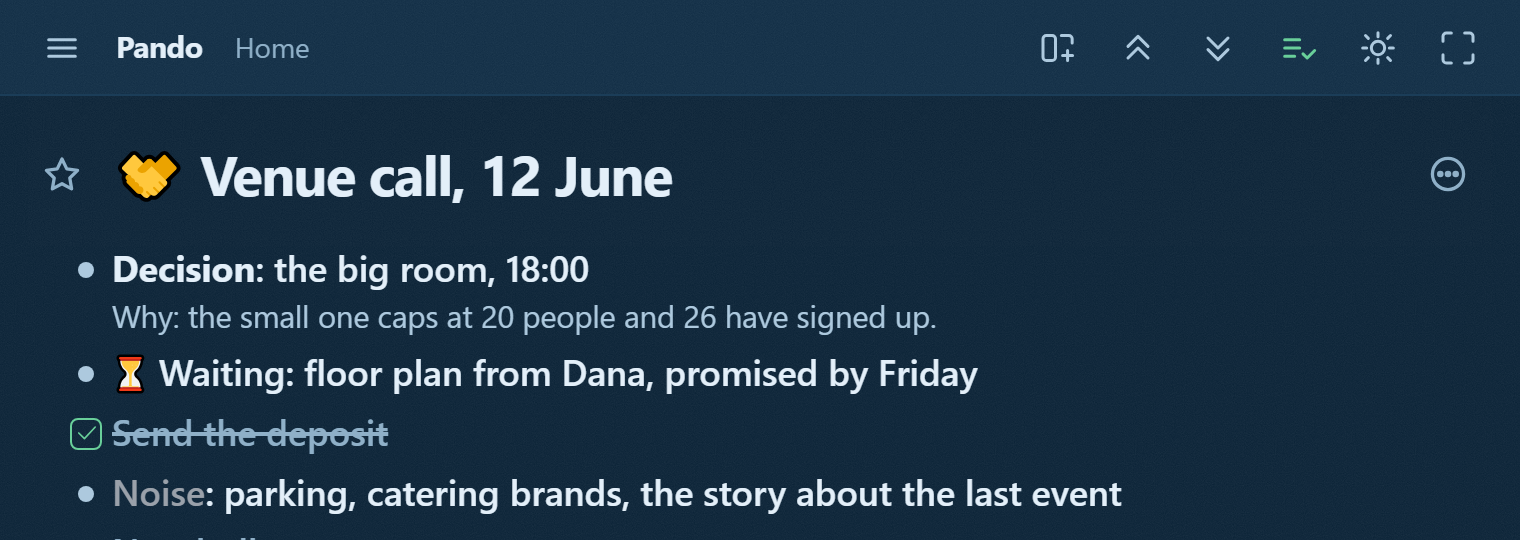
The picture shows the venue call before the move: the decision has its reason in the note, Dana owes a floor plan by Friday, the deposit is already sent and ticked, and the noise fits in one line. After the call you drag the decision into the workshop project and the waiting line into Waiting for. Each line then exists once: the decision in the project is the one from the meeting, with its reason still in its note, and the meeting note keeps the date and the noise line.
The meeting template holds a meeting branch you copy before each meeting, with a worked example about a kitchen renovation to delete once you have your own. The link opens it read-only. Show in my Pando on that page copies it to the top of your Home after you sign in.
Claude proposes, you confirm
Connected to Pando, Claude can read your newest meeting note when you ask it to, following the instruction in the template's For your agent bullet. It proposes a kind for each line and a place for it: this one looks like a decision for the workshop project, this one is a promise from Dana. When you agree, it moves them.
Claude only proposes. You confirm, because you were on the call and it was not.
Pando is free up to 5,000 bullets with every feature, agents included, and Pro costs 3 EUR a month. To try it on your next meeting, create a free account and connect Claude.