Never re-read what you have already read: a changes feed for MCP agents
by Andreas Tissen · · updated
Each new chat with Claude starts without the last one. If Claude is connected to your notes over MCP, the easy way for it to catch up is to read the notes again at the start of every session. On the 1,497-bullet test outline I measured below, one complete read is 259,954 bytes of JSON, and even the slimmest read is 106,606.
This post is for anyone who builds or uses an MCP server for notes, tasks or anything else that changes between sessions. It shows the pattern I built into Pando, the outliner I make and use every day: every write gets a sequence number, one call returns only what changed after a given number, and the agent keeps that number somewhere it will find it next time. The byte counts below are measured, and so is the point where the pattern stops paying.
What the agent sends and gets back
The MCP tool is called changes. The agent sends the cursor it was handed last time, here since: 3, and gets back the bullets that changed after it. This is a real answer from a local Pando server, after one task was renamed and one was added under a project (ids shortened):
{"root":"01M7C6XG…","rootText":"Home","since":3,"cursor":"5","more":false,
 "resync":false,"changed":[
  {"id":"01M7C6XGBA…","text":"Write the copy for the front page, two versions","path":["Website relaunch"]},
  {"id":"01M7C6XGFH…","text":"Ask Dana about the photos","path":["Website relaunch"]}],
 "removed":[],"elsewhere":0}
That answer was 386 bytes. Each changed bullet comes with its current text, its note if it has one, and its path from the root, so the agent knows where it sits without a second call. Deleted bullets would be listed under removed, together with the ids of everything that went with them. The agent stores the new cursor, 5, for next time.
Measured on a 1,497-bullet outline
I measured on a test account rather than on my own notes: an outline of 1,497 bullets built by a script to the shape of my real one (the same branch sizes, German beside English, empty bullets and all). The script then played a week of editing on it: 539 saves, including ticks, moves, deletions and one import of 241 bullets, which changed 731 bullets in all. Everything ran against a local copy of the server on 14 November 2026, and the sizes are the bytes of each answer as the agent received them.
| What the agent asked for | Bytes |
|---|---|
tree, the whole outline in full mode (notes, dates, placements) | 259,954 |
tree, the whole outline in outline mode (text and structure only) | 106,606 |
changes after five bullets were edited | 642 |
changes after the week (731 changed bullets, two pages) | 100,373 |
changes with no cursor at all (the first session) | 167,402 |
The ratios follow from those rows. After five edits, the feed is 405 times smaller than a full read and 166 times smaller than an outline read. After the busy week it is 2.6 times smaller than a full read, and only 1.06 times smaller than an outline read. Outline mode is the fair comparison, because a careful agent reads that way anyway: it drops notes and timestamps and is 59% smaller than full mode on this outline.
The week's answer works out at about 136 bytes per bullet it names (100,373 bytes for 731 changed and 6 removed). An outline read costs 106,606, and 106,606 divided by 136.2 is 783. So once about 783 bullets have changed, a little over half of this outline, reading the tree in outline mode is as cheap as asking what changed, and above that it is cheaper.
The first session is the expensive one. Without a cursor, changes answers with the whole branch as a fresh reading, marked resync: true, and on this outline that cost 167,402 bytes, more than an outline read. Its value is the cursor it hands back. These are bytes, not tokens; for JSON like this a token is roughly four bytes, so the week's catch-up is in the region of 25,000 tokens.
The tool's own description in Pando still quotes an earlier measurement, from August, of five changes on my own outline: 1,060 bytes against 962,608 for reading the tree in full. Answers have been trimmed since then, which is why the full read in the table is much smaller.
Where the cursor lives
The number is only useful if the next session can find it. A chat app forgets it when the chat ends, and pasting it into a system prompt by hand after every session is a chore you will skip on the day it matters.
Pando gives each connected agent a bullet of its own to remember in, called "Claude's memory" and placed under Home unless you pick another place. The remember tool writes there, and changes with no branch named reads that same bullet. In my setup the agent's memory holds the instruction to call changes first, with the last cursor next to it, and that is the only reason it does. Calling changes is up to the agent; Pando does not do it for it. How such a memory branch is laid out is in give your agent a memory.
You see the same thing from the other side in the app. The Changes view in the sidebar lists what was created, completed or edited in the last hour, day or week:
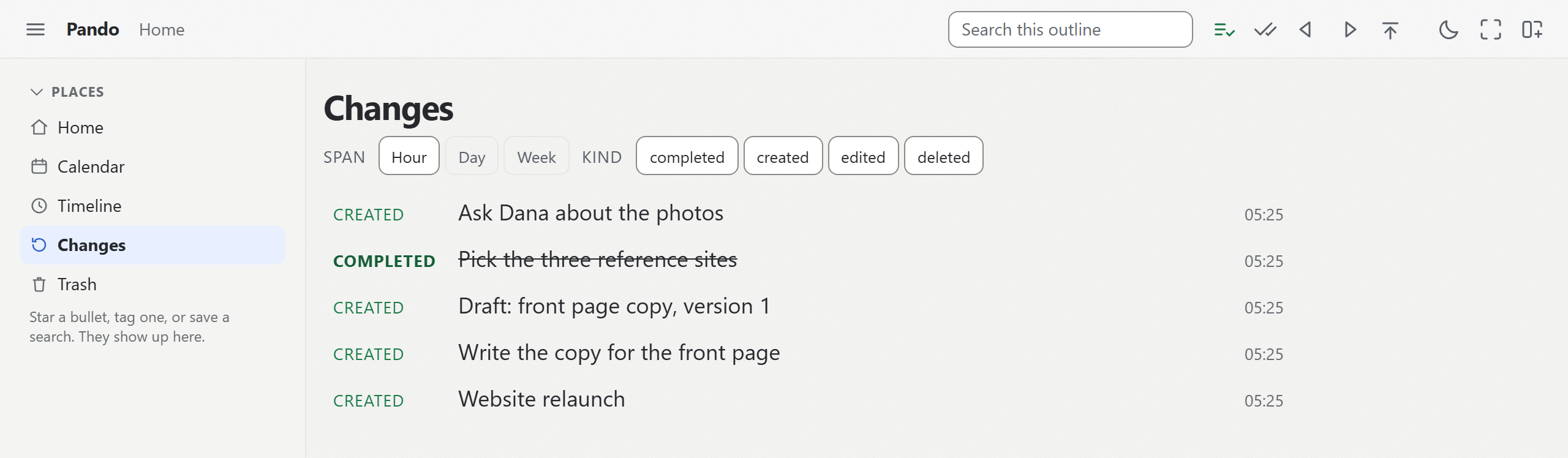
If you correct a line in Claude's memory on your phone, the next changes call returns that line with its path, and nothing else.
Writing back without rewriting
The same waste exists on the way in. In Pando's test suite, eleven edits came back as 648 bytes as one batch that answers with ids only. The same batch, echoing each whole bullet: 1,745. Sent one at a time: 2,157.
Adding one line to a long note with appendNote cost 83 bytes, where reading the note and sending all of it back cost 13,018 over two calls. A rewrite also sends back the version the agent read, so a line you added to that note in the meantime is overwritten. Repeating facts can go into a table instead of a paragraph, where an update is one cell.
Try it on your own notes
changes is one of the 12 tools on Pando's MCP server, and it works the same on the free plan, which holds 5,000 bullets. To see it on your own outline, connect Claude to Pando, let it read one branch today, and ask it tomorrow what changed since then.