Where does this note go? PARA files it by when you will act
by Andreas Tissen · · updated
You have a note about a supplier for the kitchen you are renovating: a contact, a quote, a delivery date. It could go under Suppliers, under the Kitchen project, under Finance or under Contacts. Each choice can be defended. You spend a few seconds choosing, next Tuesday you choose differently, and a year later the notes about that supplier are in four places and you cannot find any of them.
Tiago Forte's PARA asks a narrower question instead. Rather than "what is this about", it asks how soon you will act on the note. This post explains the four buckets it sorts by and shows them in Pando, the outliner I built, where moving a finished project to the archive is one drag.
Four buckets, ordered by when you will act
PARA was described first on Forte's blog and then in his book The PARA Method (2023), and his phrase for it is "organize by actionability": you file a note by how soon you will do something with it, not by its topic.
- Projects are short efforts with a goal and an end, such as "Kitchen renovation, done by March". Each has a definition of done.
- Areas are parts of your life or work that need ongoing attention and never finish: Health, Bookkeeping, the reliability of a product you run.
- Resources are topics you may want later and are not responsible for, such as a collection of good pricing pages.
- Archive holds anything from the other three that is finished or dormant.
Every note goes into the most actionable bucket that fits. The supplier note goes under the Kitchen project while the kitchen is in progress, because that is where you will look when you need it, and when the kitchen is done the whole project moves to Archive with the note inside it.
When the buckets stop moving
PARA depends on movement. A new project grows out of an Area, a finished one drops into Archive, and an archived one comes back when the topic returns. In tools built on folders, moving a project means moving a folder full of files. That is easy to put off.
Once the moves stop, Projects fills up with things that finished months ago. The list then no longer tells you what you are working on this week. Every bucket still exists, but none of them moves.
Four bullets you can drag
In Pando the four buckets are four bullets. A project is a bullet with children, and moving it to Archive is one drag that carries everything under it. In the picture, this month's workshop sits under Projects while the March edition already lies in Archive.
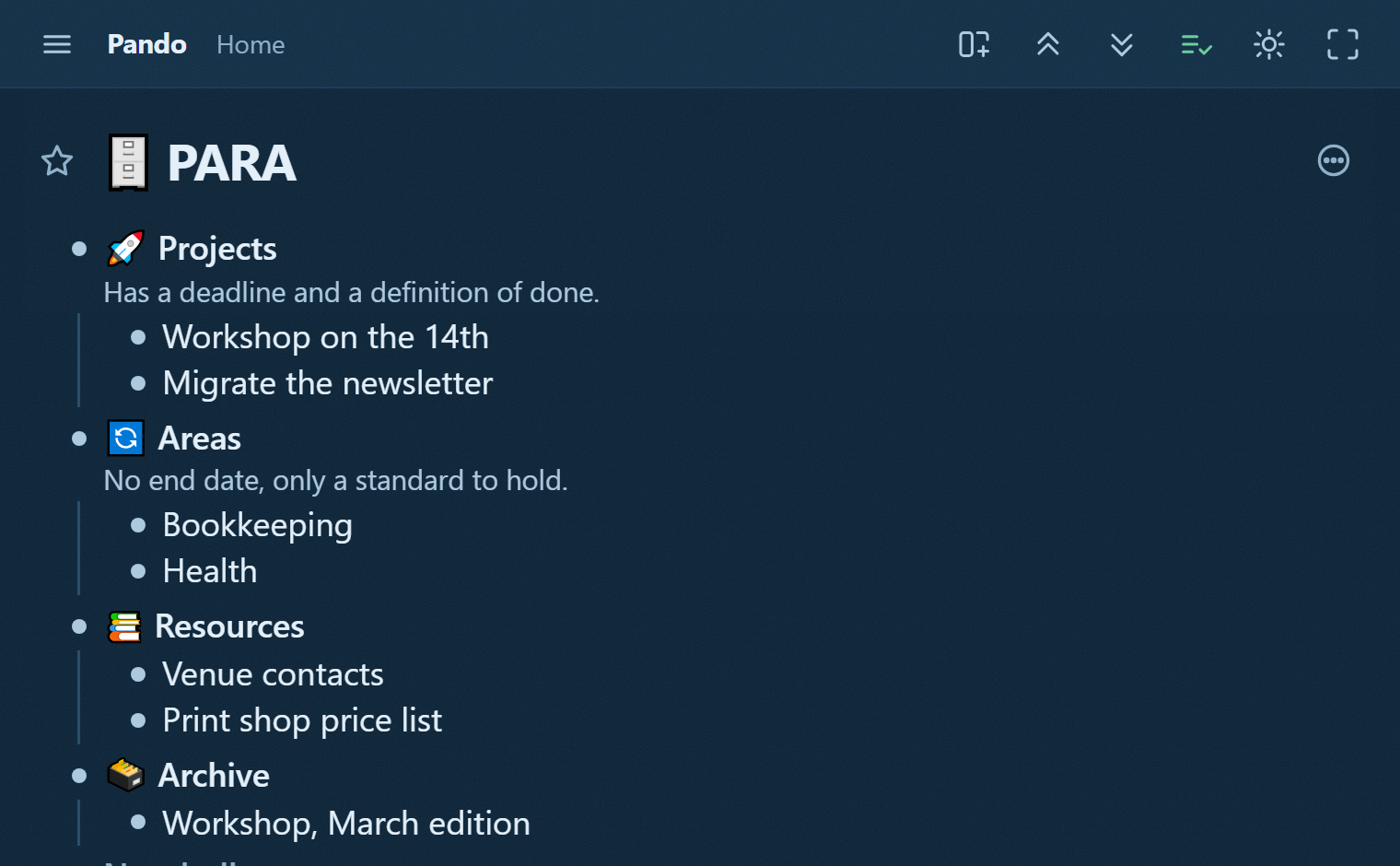
Because the buckets are bullets, you can keep Projects open and fold the other three. That one view shows what has a deadline this month. Nothing is converted when a note changes bucket; the same bullet stands somewhere new. If a note really belongs in two places at once, a mirror lets it stand in both, which the Zettelkasten post uses for notes that fit several topics.
The four buckets with their notes are in the PARA template; the link shows the branch read-only, and Show in my Pando copies it to the top of your Home when you are signed in. Each project slot asks for a deadline and a "done when" line, the short form of a five-bullet project brief.
A monthly sweep that Claude prepares
With Pando connected, Claude can read the four buckets and move bullets between them, so it can do the bookkeeping while deciding what counts as a project stays with you.
Once a month you ask it for the sweep. It reads Projects and lists the ones that look finished or are past their deadline, and it names Areas with no project under them, for example an Area "Health" with nothing active. Each suggestion lands in your outline as a checkbox addressed to you, such as "Move Workshop on the 14th to Archive?". You tick the ones you agree with. On its next pass Claude moves exactly those and leaves the rest where they are.
Pando is free up to 5,000 bullets with every feature, agents included, and Pro costs 3 EUR a month. To try PARA with Claude preparing the monthly sweep, create a free account and connect Claude.