Reading notes nobody reads: put your own sentence on top
by Andreas Tissen · · updated
You finish a good book with thirty passages highlighted on your e-reader. You export them into your notes app and the import says 30 notes added. Then you do not open them again. Six months later you remember that the book was good and very little of what it said.
The highlights did their job while you were reading. Afterwards each one is somebody else's sentence. It is hard to use until you can say the idea in your own words. The shape below puts your sentence first; I show it in Pando, the outliner I built, where the notes on a book sit in the same outline as the work they are meant to change.
Your sentence is the parent
The rule is about order. Write the idea in your own words as the bullet. Put the quote underneath it as a child, with its source, and add a second child that says where the idea applies to you.
The picture further down shows one idea from Atul Gawande's The Checklist Manifesto. Gawande writes in the introduction that "the volume and complexity of what we know has exceeded our individual ability to deliver its benefits correctly, safely, or reliably", and the book's argument builds from there to checklists. The parent line above that quote reads "Checklists work because they catch the step experts skip", with the note "My words, not the book's". It is close to the book's main argument, which is fine for a book's main idea; what it adds is the angle you care about, skipped steps, in a sentence short enough to remember. The second child, "Apply: the deploy list gets a verify DNS step", is the line you will act on.
Rewriting takes a minute or two per idea. It also changes what the list is for. Your sentences sit at the top, so the notes on a book become a handful of lines you can scan in a minute, with the evidence one level down. Sönke Ahrens gives similar advice in How to Take Smart Notes (2017): keep notes on what you read short, in your own words, and quote sparingly.
A test for each idea
To check an idea, cover the quote and say the idea out loud; if you cannot, the note is still a bookmark and needs another pass.
Thirty highlights from one book are more ideas than you are likely to act on, and some of them will turn out to be the same idea marked twice. The template has room for about six ideas per book. Treat that as a starting point. A dense book may give you ten ideas, a thin one two.
Where good ideas get stuck
A good idea from a book should end up somewhere: as a line in a checklist, a decision in a project, a rule for next time. When the reading notes live in an app of their own, getting it there means noticing the connection and then retyping the idea in the other app, on a day when you are busy with something else. The retyping is where it tends to stop.
The book next to the work
In Pando a book is one bullet, each idea is a child with its quote and its application underneath, and the projects you work on are in the same outline.
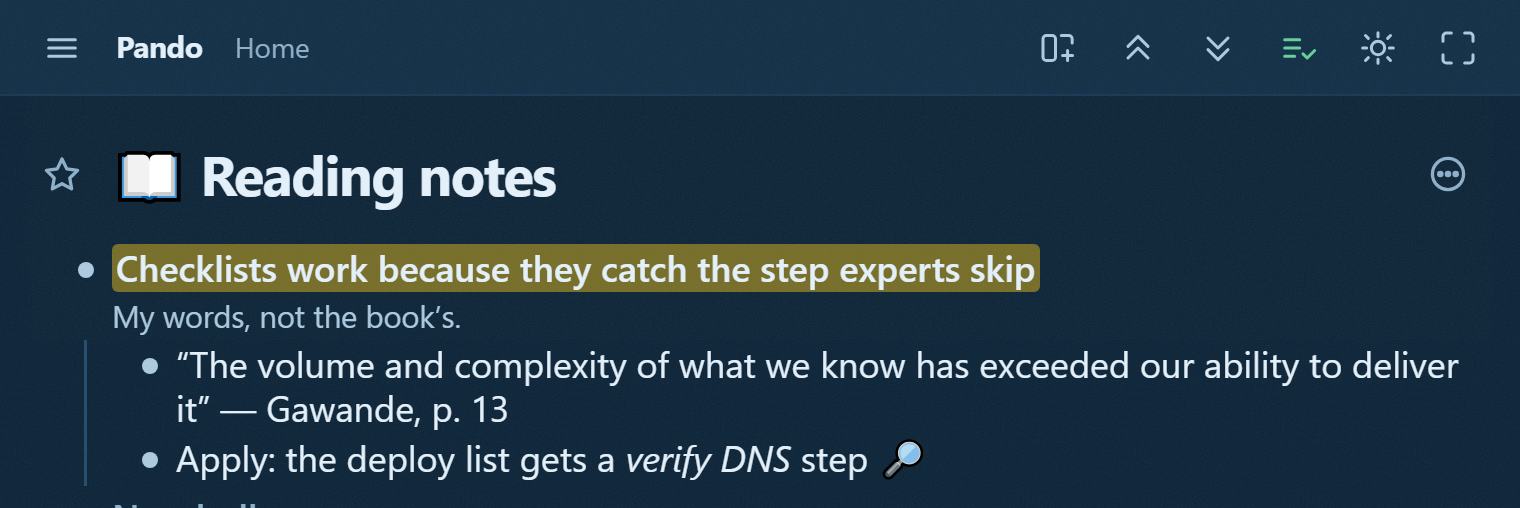
So the verify DNS line can be mirrored into the release checklist it changes, and because a mirror is one bullet in two places, it becomes a line you tick before every deploy and stays in your notes on the book, with nothing retyped. The checklist post shows the list it lands in, and the Zettelkasten post uses the same mirrors for ideas that belong to two topics.
The reading-notes template has this shape with empty slots. Its page shows the branch read-only. The Show in my Pando button there copies it to the top of your Home once you have signed in.
Claude groups, you rewrite
If Claude is connected to your Pando, you can paste your exported highlights into a chat with it, together with the instruction from the template's For your agent bullet. Claude groups the highlights by theme and writes them under the book bullet, one draft idea line per group, with the quotes as children.
The draft lines are a starting point. You rewrite each one in your own words, because that is where you find out whether you understood the book; Claude has saved you the sorting.
Pando is free up to 5,000 bullets with every feature, agents included, and Pro costs 3 EUR a month. To try it on the last book you read, create a free account and connect Claude.