Which agents can run your CLI, and which need a hosted MCP server
by Andreas Tissen · · updated
Eric Holmes' advice to people who build tools for agents, in "MCP is dead. Long live the CLI" (28 February 2026), is short: "Ship a good API, then ship a good CLI. The agents will figure it out." For an agent with a terminal, that is good advice. Some of the people who use your tool do so through the Claude app on a phone, or through ChatGPT in a browser tab. Their agent has no terminal, so for them a CLI does not exist.
This post is for people who build tools for agents and are deciding between a CLI, an MCP server, or both. It sets out where the CLI argument holds, which agent surfaces can run a command-line tool, and which can only reach a server on the internet. I make Pando, an outliner with a hosted MCP server, so I am on the server side of that choice. The vendor pages quoted were read on 14 November 2026, the CLI articles and their Hacker News threads on 23 September.
The case for the CLI
Holmes argues that models already use command-line tools well and that commands compose. A failed command can be rerun by hand to see why, and a CLI reuses the login already on that machine. Local MCP servers, by contrast, are processes that have to start, stay up and "not silently hang".
The stronger argument is about tokens. The mcp2cli project measured a task manager with 30 tools: 54,525 tokens over 15 turns through MCP, 2,309 through its CLI. Its writeup also states the caveat. The MCP baseline puts every tool schema into every turn, with no deferred loading. The same writeup estimates that Anthropic's Tool Search, which loads a schema only when needed, saves about 85% on its own. Applying that 85% to the 30-tool case is my arithmetic, not theirs, and it leaves roughly 8,200 tokens against the CLI's 2,309. The CLI still uses fewer tokens.
Simon Willison put the boundary plainly in the top comment under one of those threads, on 20 September: "Sure, there's almost no reason to use MCPs if you are running a full-blown terminal agent ... with unfettered internet access - just let it call APIs directly." I agree. In the Obsidian guide I say the same about notes: if Claude Code runs in the folder with your notes, you need no MCP server.
Which agent can run your CLI
| Where the agent runs | Can it run your CLI? | Can it reach an MCP server? |
|---|---|---|
| Claude Code or Codex in your terminal | yes, on your machine | yes, local or remote |
| Claude app on a phone, or claude.ai, in a chat | no | a remote one, called from Anthropic's cloud |
| Claude app driving your computer with Remote Control | yes, on your computer, which has to stay on | yes |
| Claude app, Code tab, a cloud session | yes, in a VM Anthropic hosts, on a GitHub repository | yes |
| ChatGPT in a browser tab | no | a remote one, over public HTTPS or a tunnel |
For a consumer tool, the chat row matters most. Anthropic's help page on custom connectors says Claude "connects to your remote MCP server from Anthropic's cloud infrastructure, rather than from your local device", and that this holds "across every Claude client, including claude.ai, Claude Desktop, Cowork, and the mobile apps". OpenAI's developer documentation says a custom server must be reachable "through a public HTTPS endpoint or Secure MCP Tunnel".
The two middle rows need a word more. Remote Control lets the phone app drive Claude Code on your own machine. Anthropic's page says "your computer has to stay on and the claude process has to keep running". A cloud session, started from the Code tab of the Claude app, runs Claude Code in a virtual machine Anthropic manages. It works on a GitHub repository and has limited network access by default. A CLI can run in either. Both are real routes for developers. Both are Claude Code rather than the chat, both need a paid plan (Pro or above), and neither is a place where a non-developer installs your tool.
So a tool that ships only a CLI reaches developers in a terminal and nobody in a chat app. The login point turns around as well: a CLI uses credentials stored on its machine, and a chat on a phone has no machine of yours. A hosted MCP server signs the user in once through a consent page, and the chat app keeps the key.
What that looks like for one hosted server
Pando's server lives at one address, https://pando.ink/mcp, and nothing of it runs on your computer. In claude.ai or the Claude desktop app you add it as a custom connector under Customize, Connectors, and the Free plan allows one. OpenAI's help page lists custom MCP servers in ChatGPT for Business, Enterprise and Edu workspaces (read 11 November 2026). Once added on a computer, the connection also works from the phone apps. Connecting sends you to Pando's consent page:
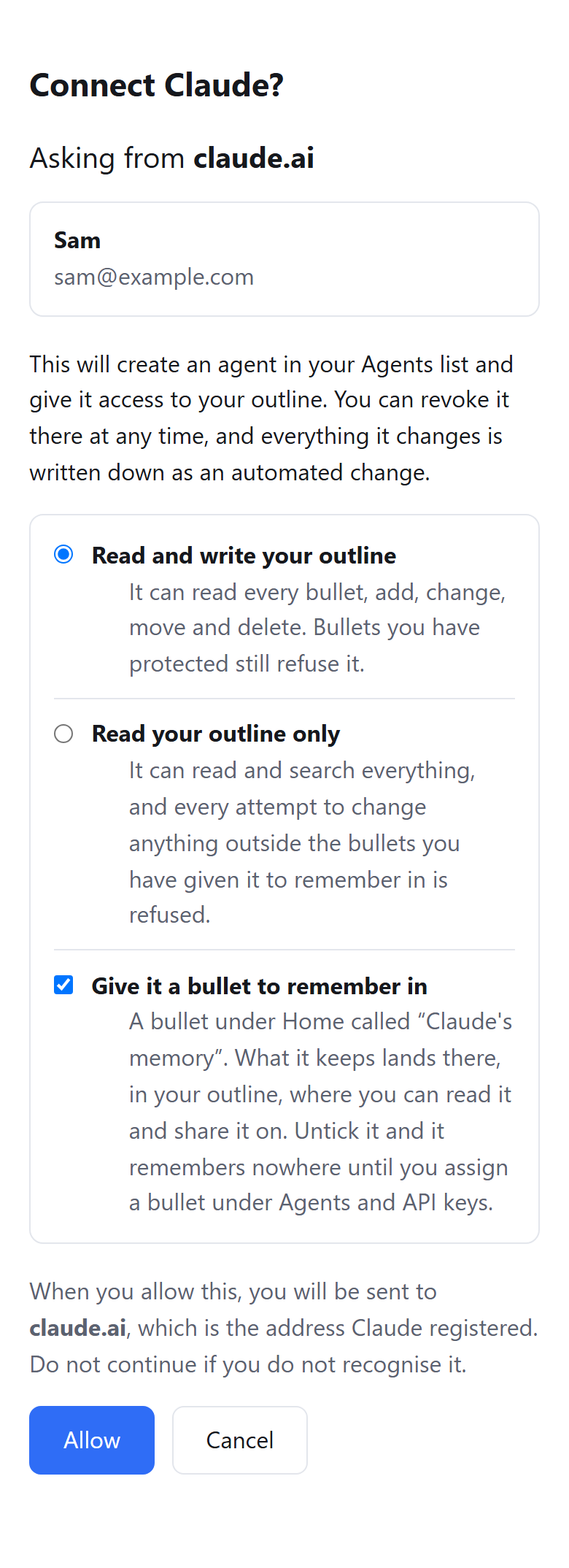
You choose read and write or read only, and the ticked box gives the assistant a bullet under Home to remember in. The connection stays until you remove it in the Agents and API keys panel, and you can revoke it there at any time. From the phone I use it as an inbox. The assistant files what only I can do as checkboxes, and I tick them; the branch is the one in the inbox template. Pando runs no model of its own; the assistant you already use does the thinking.
If your tool should reach both
Ship the CLI for terminal agents, where Holmes and Willison are right, and a remote MCP server for people in a chat app. To see the server side from a phone first, use a free Pando account, which holds 5,000 bullets. Connect Claude or ChatGPT to Pando and ask it, from the phone, to file its first task for you.