The Eisenhower quadrant that stays empty unless you fill it
by Andreas Tissen · · updated
Look back at last week. On Tuesday the checkout broke and you fixed it. On Wednesday the bank needed a call before 16:00. On Thursday somebody wanted slides for a board meeting. And the backup restore you have meant to test since March was not touched, again, because nothing about it was due.
The Eisenhower matrix was drawn for weeks like that one. It sorts work by two questions, whether it is urgent and whether it is important, and it shows which kind of work your week actually went to.
From a remark to a grid
In a speech in Evanston in August 1954, Dwight D. Eisenhower quoted a former college president, whom he did not name: "I have two kinds of problems, the urgent and the important. The urgent are not important, and the important are never urgent." (Quote Investigator traced the wording to the transcript of that speech.) Stephen Covey turned the idea into a grid in The 7 Habits of Highly Effective People (1989). One axis is urgency and the other importance, which gives four quadrants, and Covey called the important-but-not-urgent one Quadrant II and argued that effective people move as much of their time as they can into it.
Neither Eisenhower's speech nor Covey's grid uses action names for the quadrants. The board below uses four: Do now for urgent and important, Schedule for important but not urgent, Delegate for urgent but not important, and Drop for the rest. Each one says what to do with the card.
The backup that never rings
Nobody writes to tell you the backup has not been tested, and nobody calls about the plan for next quarter. The checkout, the bank and the slides all arrived with a person or a deadline attached, and you noticed them without trying. So Do now fills every day, Delegate and Drop get a few cards, and Schedule stays empty unless you put things there on purpose.
A matrix drawn once on paper shows this for one week. It does not help the week after, because the work happens somewhere else and the drawing is not redrawn.
A board with four lanes
Pando, the outliner I build, keeps everything as bullets inside bullets, in the browser and on the phone, and Claude can work in it over MCP once you connect it. Any bullet can be shown as a board: its children become lanes and their children become cards. The matrix is one bullet with four lanes.
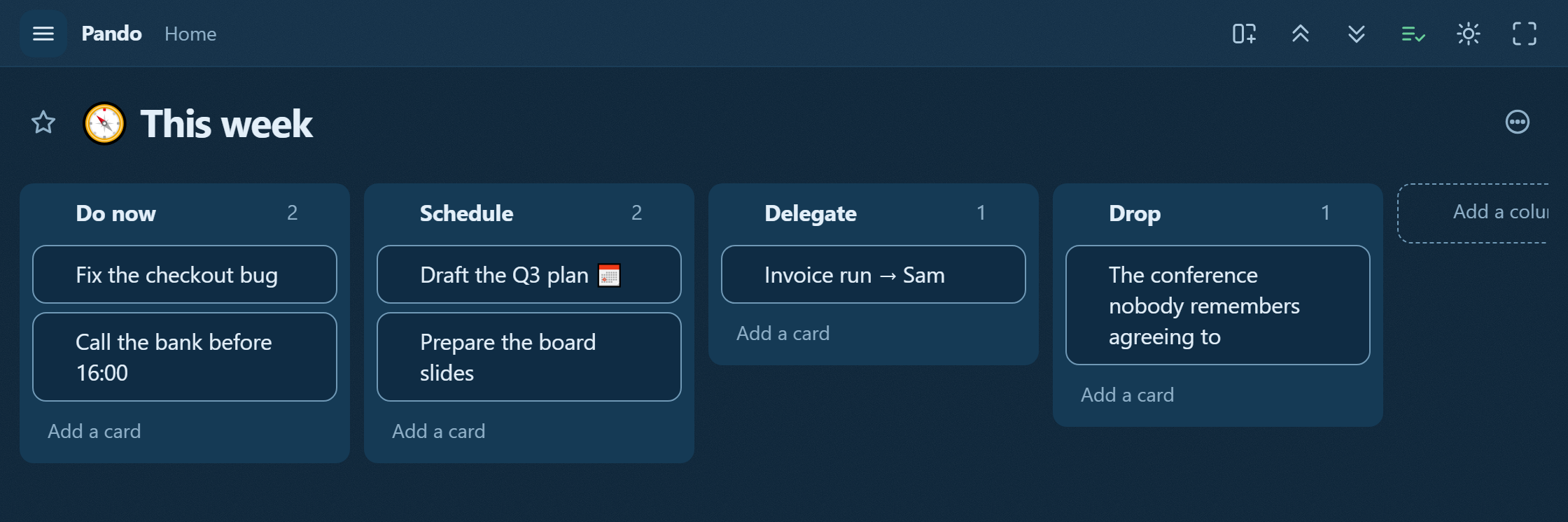
The slides went to Delegate: they were urgent, but Sam can draft them. The backup test went to Schedule with a day and a time on the card, and the card "Board review, every Friday" stays in Schedule for good, because reviewing the board is important and never urgent. The layout follows the Eisenhower template, which arrives with one grey example card per lane.
Two moves keep the board useful. When the same urgent card comes back to Do now for the third time, add the Schedule card that would stop it, such as "make the checkout stop breaking this way". And a card in Delegate or Do now that has not moved for three weeks while nothing broke goes to Drop.
The number to watch is how many Schedule cards have a day on them. A dated card can become a block in your time-blocked day, and the best candidate for tomorrow's frog is often one of them. Each card is still a bullet, so its notes and next steps sit underneath it.
Claude checks the board on Friday
With Pando connected, Claude can read the board and write in it. The prompt on the Board review card asks for three things: name any card that has come back to Do now more than once and propose the Schedule card that would end the repeats, list every Schedule card without a day, and flag cards that sat in Delegate or Drop for three weeks untouched. Claude proposes and moves nothing; you give each undated card a day or drag it to Drop.
That check fits into the weekly review, on the same screen as the board.
Pando is free up to 5,000 bullets, and Pro costs 3 EUR a month. To keep an Eisenhower board that Claude checks every Friday, create a free account and connect Claude.