Moving into Pando from another outliner: what the export file keeps
by Andreas Tissen · · updated
Moving into Pando takes one file if your old outliner exports OPML, and one import per page if it exports Markdown. Pando does not open zip files and takes one file per import, so a Notion or Roam export of 400 pages is 400 imports, unless you join the pages into one file first. A short script for that is further down.
Pando is an outliner I build: one outline of bullets inside bullets, in the browser and on the phone, with a hosted MCP server so that Claude or ChatGPT can read and write in it. It is free up to 5,000 bullets. The examples on this page come from small test files I wrote myself in each app's format and imported into Pando's public demo on 14 November 2026. They are not exports from real accounts, so look at your own file in the preview before you bring it in.
Three kinds of export file
What carries over depends on the file type. There are three kinds, and you can tell which one you have before you start.
| File | What arrived from my test files | Who hands you one |
|---|---|---|
| One OPML file | the whole tree: nesting, notes, ticked items, and bold or italic inside a line | Workflowy and Dynalist, among others |
| Markdown, CSV or TSV | the shape and the words of one file at a time | Obsidian, Logseq OG (its pages are Markdown files), Roam's Markdown export, any spreadsheet |
| A zip | nothing until you unpack it yourself | Notion's export, Roam's export, most whole-account exports |
If your old app can write OPML, choose OPML. Workflowy's help page on exporting and Dynalist's help page "Export list or document" both list it.
What never comes across
Every imported bullet gets a new address in Pando, so a link from one of your bullets to another stops pointing anywhere. A mirrored bullet arrives as two ordinary copies. Pictures are not fetched; an image link arrives as its address. Which branches were folded, who you shared what with, and when anything was created or changed stay behind as well.
Finding the importer
In Pando, open the bullet you want the outline to land under. Open its menu (the round button next to its title), type "import", and choose "Import a file…". You pick one file at a time. Pando reads .opml, .md, .txt, .csv and .tsv files and works out the format from what is inside; there is no setting to choose it yourself. The preview's heading names the format it read, and Cancel writes nothing.
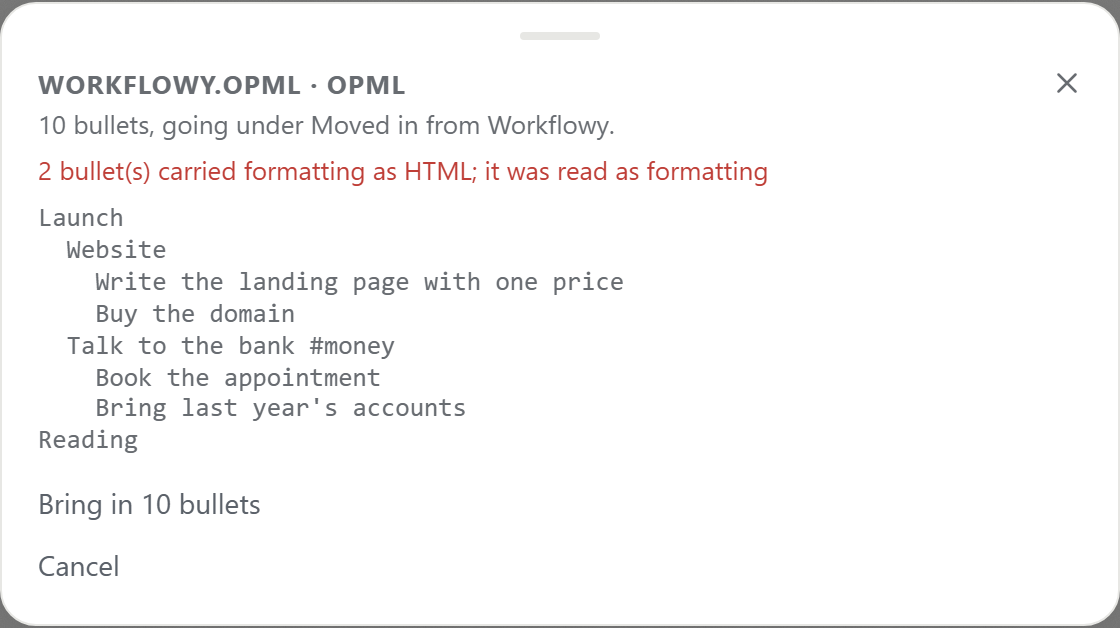
Warnings appear in red at this point, while there is still nothing to undo. A file that is not text, such as a zip or a PDF, is refused with "Nothing in it" instead of being turned into bullets of noise. A large file goes in as a run of saves of 400 bullets each, and the message says so: "24,001 bullets, in 61 pieces. Ctrl+Z takes them back out a piece at a time."
The format guess can go wrong in two cases. Text indented with tabs on most lines is read as a spreadsheet, because that is what a spreadsheet pasted as text looks like. And text indented with spaces but without bullet markers turns its indented lines into notes on the line above, and the preview says how many. If the heading names the wrong format, cancel, fix the file and try again.
What an OPML file brings
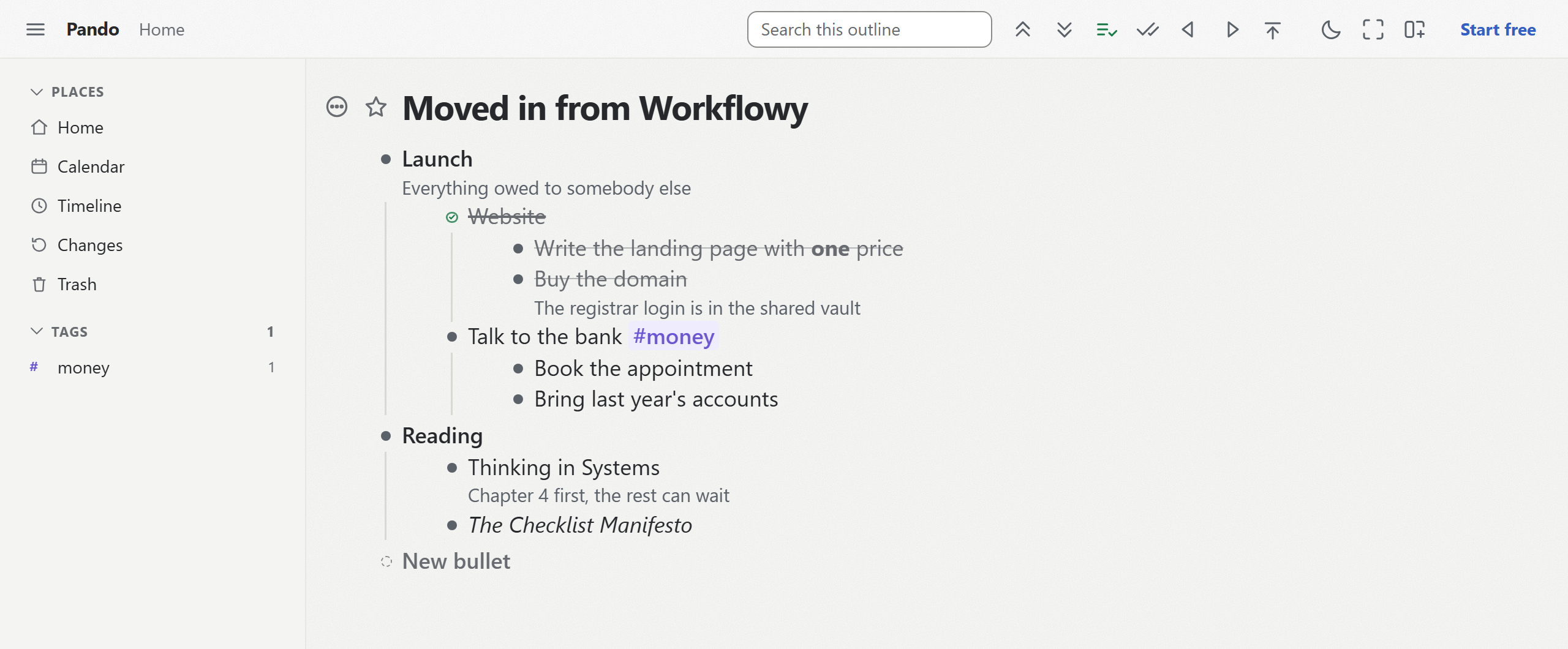
My OPML test file followed the way Workflowy writes one: a note, a completed item with children, a tag, and a bold and an italic word. All of those arrived. The notes sat under their bullets, the completed item came in ticked with its children, #money became a Pando tag, and the marks stayed marks. Pando vs Workflowy compares the two apps beyond the import.
A test file in Dynalist's OPML format behaved the same way. Its dates are written as !(2026-11-20); Pando recognises the date inside, and the !( and ) stay as characters, as Pando vs Dynalist shows with a picture.
Markdown, one file at a time
A test file in Obsidian's Markdown kept its structure: headings stayed headings, - [ ] became a checkbox, - [x] a ticked one, and a numbered list stayed numbered. Roam and Logseq files keep their shape, but their own syntax arrives as plain characters.
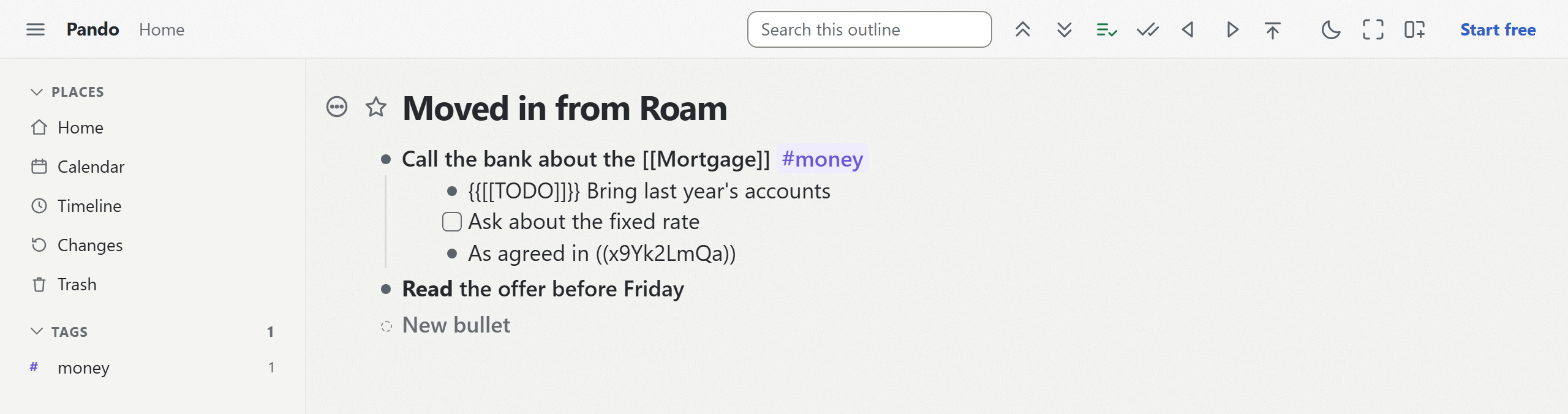
So a [[Page]] link stays as those characters, a block reference stays as its id, and a TODO marker stays a word. Replace the markers with [ ] and [x] in the file before you import if you want checkboxes. Pando vs Roam Research goes through the rest for Roam users.
For a folder of pages, join them into one file before you import. In a terminal (macOS, Linux, or Git Bash on Windows), inside the unpacked folder, this writes pando-import.md one level up:
for f in *.md; do echo "- ${f%.md}"; sed 's/^/ /' "$f"; echo; done > ../pando-import.mdEach page becomes a bullet named after its file, with the page's lines indented under it. It takes the files of one folder, not its subfolders. I tried it on two test pages: the lists nested under their page, and a line of plain prose became a note on the line above it, which the preview reported.
Try one branch first
Export one branch from your old app, bring it in, and look at what happened before you move everything. The way out of Pando uses the same formats as the way in: Markdown, OPML, a spreadsheet or formatted text, for one branch or the whole account.
Once your outline is in Pando, Claude can read it and work in it with you. Create a free Pando account and connect Claude.