Pando vs Workflowy when you want Claude in your outline
by Andreas Tissen · · updated
Workflowy's official way for an AI agent into your outline is Workflowy Desktop MCP. Its help page, dated 30 October 2026, says "Desktop MCP is only available in the Workflowy desktop app" and asks you to keep the app running while you use it. The tools that page names are Claude Code, Codex, Cursor and VS Code, all on the same computer as the app.
So Claude can work in your Workflowy at your desk. It cannot from claude.ai in a browser or from the Claude app on your phone. This page compares Workflowy with Pando, an outliner I build and use every day, for a Workflowy user who wants that second case as well, and it says where Workflowy is still ahead.
Where the server runs
MCP is the protocol Claude and ChatGPT use to reach other apps. A local MCP server runs on your own computer, at an address only that computer can see. A hosted one runs on the internet. Claude's phone app and claude.ai connect to MCP servers from Anthropic's servers, so they can only reach the hosted kind. Which notes can Claude reach from your phone? goes through 21 note apps on exactly this question.
Workflowy chose the local kind. Its help page also says to treat the connection link like a private key, and that you can turn Desktop MCP off to stop access.
A request from the phone
Take a request like "add the three follow-ups from this call to my Projects list", typed into Claude on a phone after a meeting. With Desktop MCP it has nowhere to go, because the server runs inside the desktop app on a computer that is not with you. The same holds for a scheduled agent, for ChatGPT on the web and for a cloud runner. Workflowy's help page "Third-party tools" points to unofficial tools for other setups, among them a local Claude Desktop extension, and says it does not support them.
Pando's server is hosted at https://pando.ink/mcp. Claude on the phone, claude.ai, ChatGPT and Claude Code reach it whether or not your computer is on.
Feature by feature
| Pando | Workflowy | |
|---|---|---|
| Agent access | hosted MCP server, OAuth, 12 tools; read and write or read only | Desktop MCP inside the desktop app, which has to keep running |
| Reachable from Claude on the phone and claude.ai | yes | no official way |
| Built-in AI | none; you bring Claude or ChatGPT | Chat with your notes, AI Nodes and AI Actions |
| Free plan | 5,000 bullets, every feature, no card | 100 new nodes a month, all features |
| Paid | Pro, no bullet limit, 3 EUR a month, billed monthly | Pro, $8.99 a month, or $6.99 a month billed yearly |
| Apps | one web app, installable on a phone's home screen | Windows, macOS, Linux, iOS and Android |
What the two share
Both are one long outline where any bullet can be zoomed into and becomes the page. Both have mirrors (one bullet shown in two places), tags, saved searches and dates, and a bullet can show its children as a board or a table. Workflowy's own "Basics of Workflowy" page lists all of those, plus templates and backlinks. If your Workflowy works and no agent needs to get in from elsewhere, Pando adds little for you.
Where Workflowy wins
Workflowy has native apps for Windows, macOS, Linux, iOS and Android, per its downloads page. Pando is one web app that you can add to your phone's home screen. Workflowy also has its own AI built in, so you can chat with your notes without connecting anything.
Its free plan is softer than Pando's too. Workflowy's pricing page says that past 100 new nodes in a month you can still add more, with a popup inviting you to subscribe. Pando's free plan stops new bullets at 5,000 in total and deletes nothing.
What Pando does
Pando is a hosted MCP server in front of an outline, plus one bullet the agent can write notes into. You add https://pando.ink/mcp as a custom connector in Claude and approve it for your whole outline, read and write or read only. Claude then gets a bullet called "Claude's memory" under Home for what it should keep, and you read that bullet like any other, at your desk or on your phone. Give your agent a memory shows what ends up in it.
I also let the agent write the tasks only I can do into a branch, as checkboxes with the reason in the note, and I tick them on my phone. The inbox your agent writes for you is the long version.
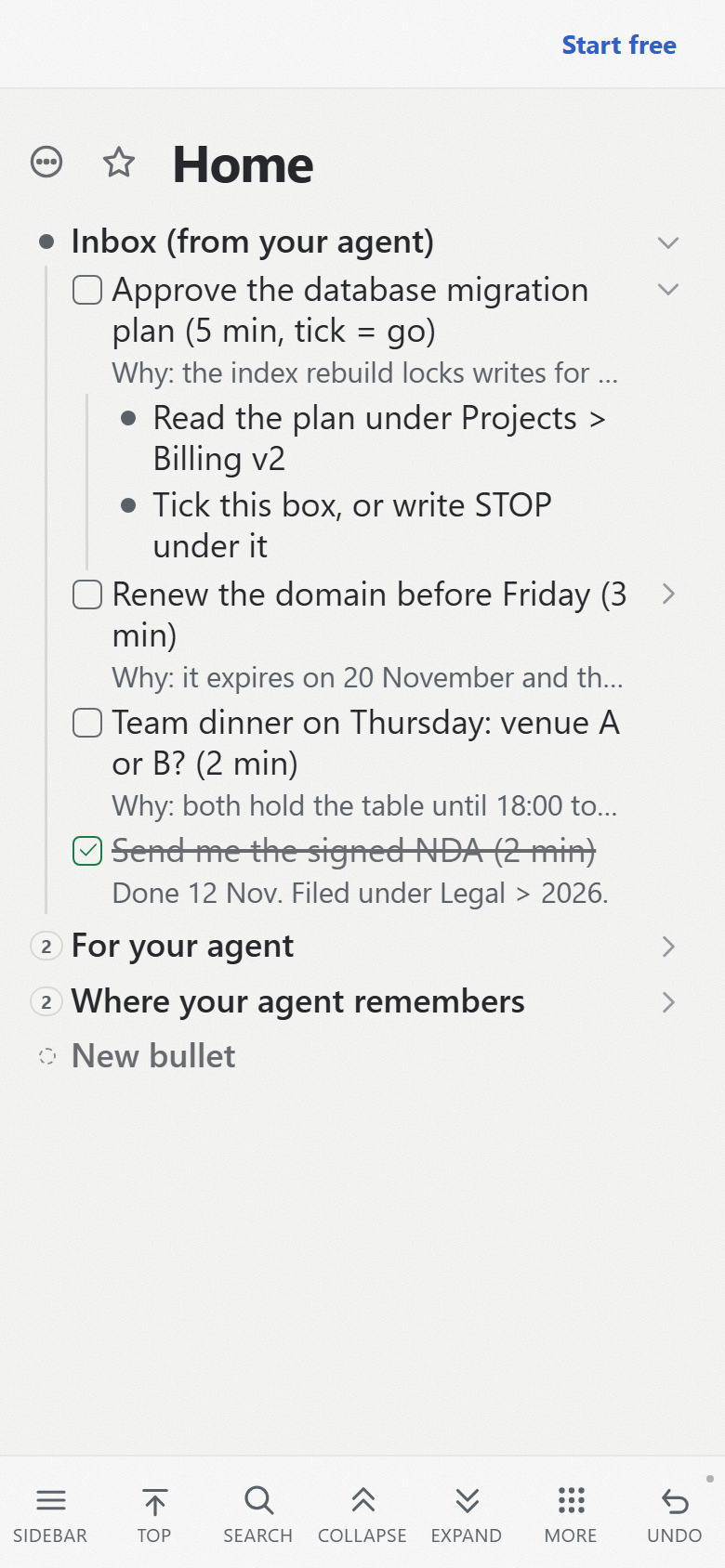
Pando needs a connection to open. If the connection drops while it is open, what you type is kept on the device and sent when the connection is back, and the status line shows how many changes are waiting. Pando is run by my company, Pyfio UG, in Soltau, Germany. It has no native apps and no AI of its own.
Bringing a Workflowy outline over
Workflowy's help page on exporting describes "Export all" in Settings and an Export entry in each bullet's menu, with OPML among the formats; you copy the result. Paste it into a plain text file that ends in .opml. In Pando, open the menu of the bullet you want it under, type "import", and choose "Import a file…".
Before anything is written, Pando shows what it read: the file name, the format, how many bullets, and where they will land.
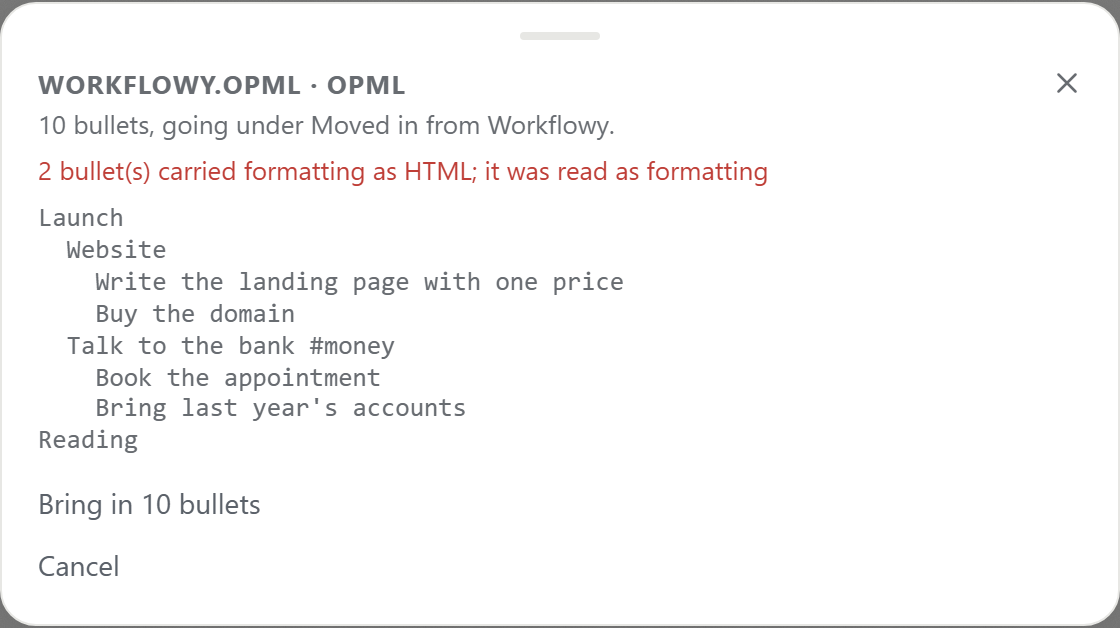
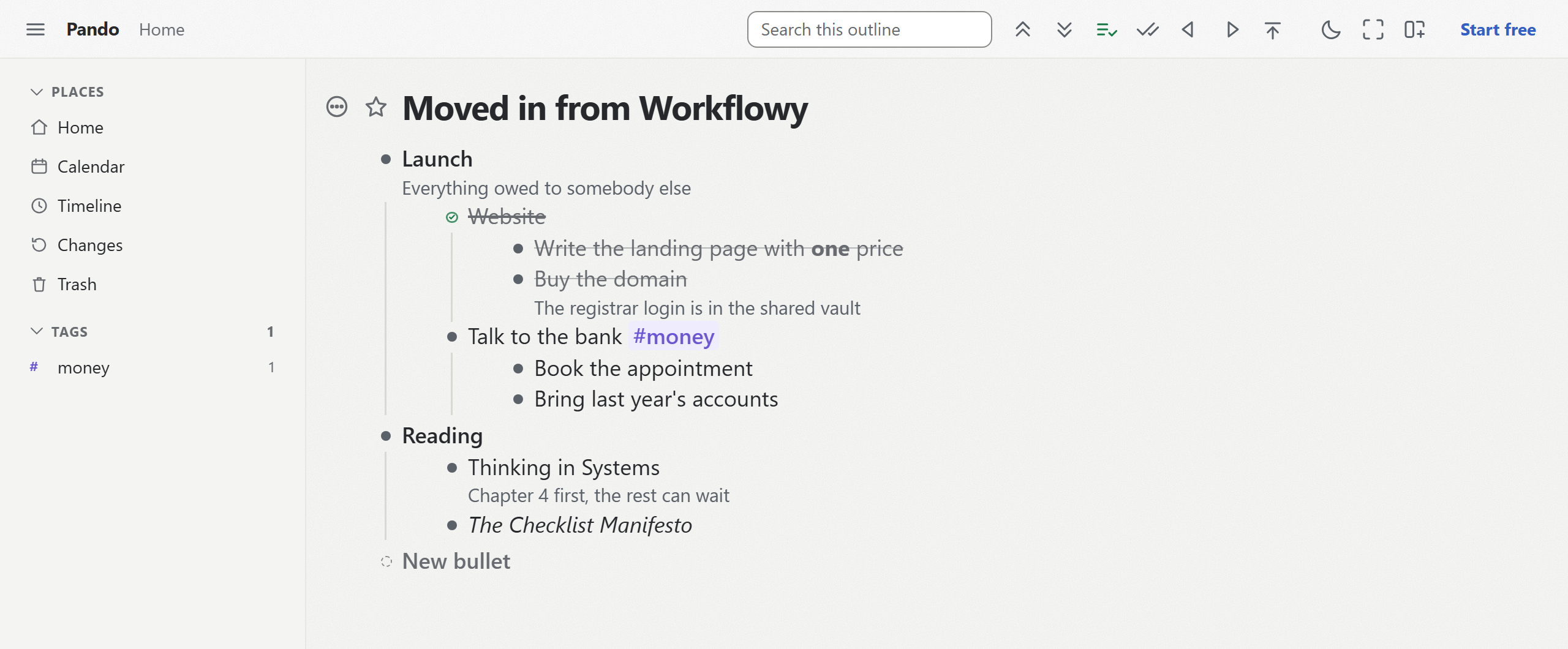
The file in these pictures is a test file I wrote myself in the OPML format Workflowy's export uses, not an export from a real Workflowy account. It had notes, a completed item and some formatting. Notes stayed under their bullets, the completed "Website" arrived ticked with its children, the bold and italic words kept their marks, and #money became a Pando tag.
Mirrors arrive as two separate copies, and every bullet gets a new address, so links between your own bullets stop pointing anywhere. Moving into Pando lists what each kind of file keeps.
Who should keep Workflowy
Stay if you outline alone, love the native apps, and either use Workflowy's own AI or only connect agents at your desk. Move, or keep a second outline in Pando, if you want Claude on your phone or on claude.ai to read and write your outline.
What I read for this, on 14 November 2026: Workflowy's pricing page (workflowy.com/pricing), its downloads page, and its help pages "Workflowy Desktop MCP", "Use Workflowy with AI", "Third-party tools", "Exporting" and "The Basics of Workflowy". Claude's connector directory had no Workflowy entry that day.
To put Claude in an outline it can reach from anywhere, create a free Pando account and connect Claude. It takes a couple of minutes, and the consent page lets you start read only.