Obsidian and Claude: when you need an MCP server, and when you need nothing at all
by Andreas Tissen · · updated
You keep your notes in Obsidian and want Claude to read and edit them, and most guides start by installing an MCP server. If your agent is Claude Code and your vault is on the same laptop, you do not need an MCP server. Open a terminal in the vault folder and start claude: a vault is a folder of Markdown files, and Claude Code reads and edits those directly.
This post covers the other cases, for anyone who uses Obsidian with Claude or ChatGPT. Two things decide which route you need: where your agent runs, and where your vault lives. The vendor pages, repositories and issues quoted here were read on 14 November 2026. I make Pando, a hosted outliner with an MCP server; it is a separate notes app, not a way into your vault, and it gets one section near the end.
Which route, by where your agent runs
| Your agent | What works | What has to stay on |
|---|---|---|
| Claude Code, on the machine with the vault | start claude in the vault folder | that machine |
| Claude Desktop | a local MCP server that reads the folder, such as mcpvault | that machine |
| An agent inside Obsidian | a community plugin such as Claudian | the Obsidian desktop app |
| The Claude app on your phone, driving your computer | Remote Control | your computer, with claude running |
| Claude Code with the laptop shut | a cloud session on a vault kept in GitHub | nothing of yours |
| claude.ai, the Claude app or ChatGPT writing to your notes | an MCP server the chat's cloud can reach | wherever that server runs |
Claude Code in the vault
Claude Code in the vault needs nothing installed. To teach it Obsidian's own formats and tools, Obsidian publishes an obsidian-skills repository (github.com/obsidianmd/obsidian-skills). Its README installs it as a Claude Code plugin, or you copy its skills into .claude/skills/ at the root of your vault. It includes skills for the Obsidian CLI and for Obsidian Headless.
Renames need care. Obsidian updates [[links]] when a note is renamed inside Obsidian, if the setting for that is on in your vault. A file that another program renames on disk arrives as a new file, and links to the old name break. The Obsidian CLI has rename and move commands that update internal links when that setting is on; the CLI needs the app running and starts it if it is closed.
Claude Desktop and plugins
Claude Desktop can start local MCP servers on your computer. mcpvault is one that reads the vault files directly; its README says "Obsidian does not need to be running, and no Obsidian plugin is required", and it talks to the client over stdio, so nothing is exposed to the network.
An agent can also live inside Obsidian. The community plugin Claudian describes itself in Obsidian's plugin directory as embedding "Claude Code/Codex and other local Agents as AI collaborators in your vault".
With the laptop closed or out of reach
Remote Control lets the Claude app on your phone drive a Claude Code session on your computer. Anthropic's page says the local session "makes outbound HTTPS requests only and never opens inbound ports on your machine", and also that "your computer has to stay on and the claude process has to keep running". It is available on the Pro, Max, Ultra, Team and Enterprise plans.
A cloud session keeps working with the laptop shut; Anthropic's documentation says it "keeps running after you close your laptop". It runs on a GitHub repository, and its changes come back as a pushed branch or a pull request that you merge. A vault kept in Git, for example with the Obsidian Git plugin, fits that.
Obsidian Headless is Obsidian's own route, in open beta: a command-line client for Obsidian Sync that runs without the desktop app on any machine with Node.js 22 or later. Obsidian's help page names this use for it: "Give agentic tools access to a vault without access to your full computer." Run Claude Code next to that copy on a machine that stays on, and your laptop can close.
When you do need an MCP server
You need one when a chat app has to write to your notes: claude.ai, the Claude app on your phone or ChatGPT. None of them reach your computer. Anthropic's help page says Claude "connects to your remote MCP server from Anthropic's cloud infrastructure, rather than from your local device", in every Claude client including the mobile apps. OpenAI's developer documentation says ChatGPT reaches a server "through a public HTTPS endpoint or Secure MCP Tunnel", and the tunnel needs a client running on your side.
Obsidian publishes no MCP server of its own. The community ones come in three shapes.
- Inside the app. The Local REST API plugin has a built-in MCP server at
https://127.0.0.1:27124/mcp/, protected by a key. That address exists only on your own machine and only while Obsidian is open. - A local process that calls that plugin, such as mcp-obsidian. Obsidian has to be open for it too.
- A local process that reads the files, such as mcpvault, which needs neither the app nor a plugin.
All three run on your computer. For a chat app to reach any of them, you put them behind a tunnel or on a server of your own and keep that running. If you choose the plugin route, check versions first: mcp-obsidian's patch tools fail against the plugin's 5.x line with error 40084, reported in issue 158 (opened 13 August, github.com/MarkusPfundstein/mcp-obsidian/issues/158) and issue 166 (11 September); both were still open on 14 November. The file-reading servers avoid that chain, at the price of not seeing anything Obsidian knows beyond the files.
A hosted service answers from its own servers, so nothing of yours has to run. Basic Memory Cloud is one built around Markdown files, with paid plans listed on its pricing page (basicmemory.com/pricing). Which notes can Claude reach from your phone lists the note apps that host their own servers.
A separate outline for the agent
Pando does not connect to a vault. It is a separate outline at one address, https://pando.ink/mcp, where the agent writes and you read, on your phone or at your desk, with no sync step and no repository. Once Claude is connected, it keeps what it learns in a bullet of its own, "Claude's memory" under Home, which you open and correct like any other bullet (give your agent a memory describes it):
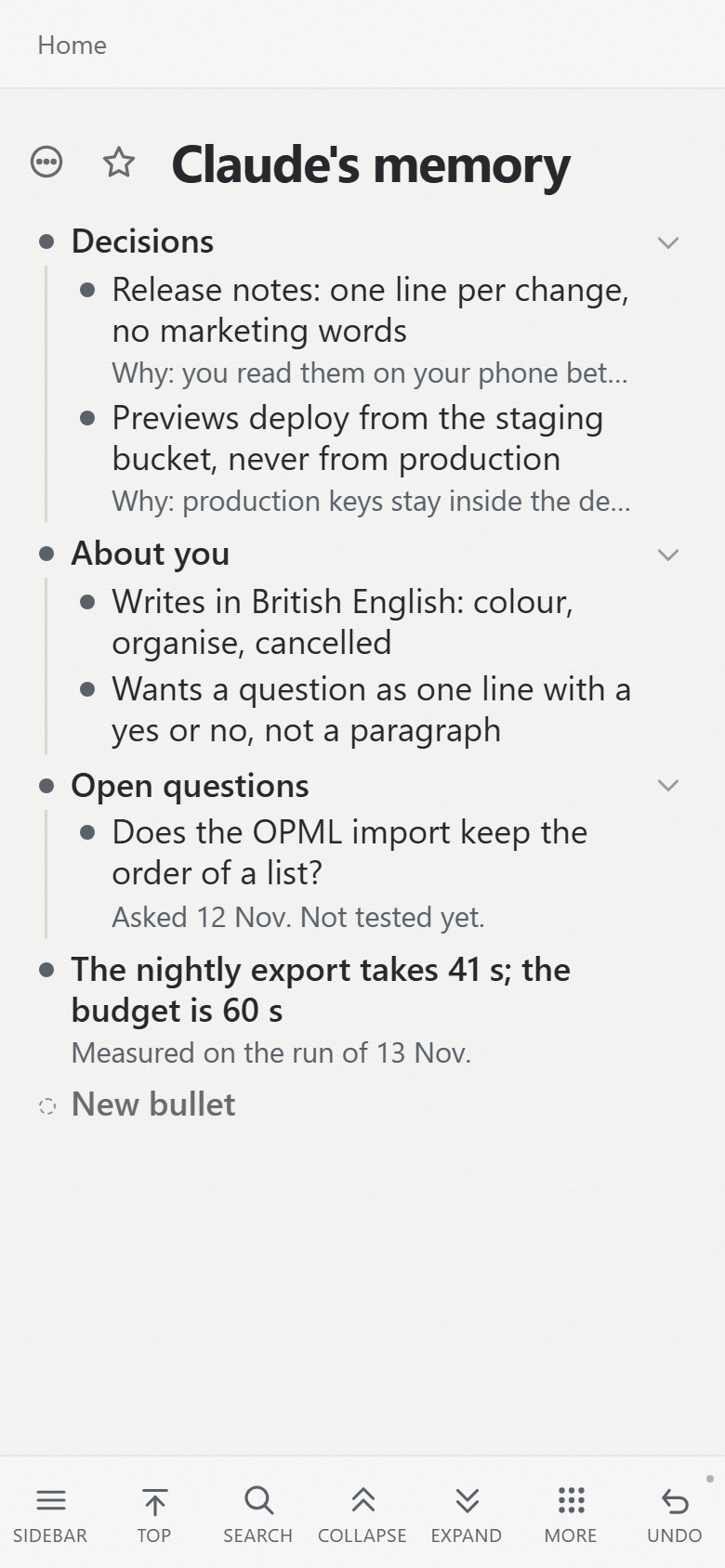
To bring something back into your vault, "Export as Markdown" downloads the branch you are looking at as one Markdown file, which you then put into the vault yourself. Your Pando notes live on Pando's servers rather than as files on your disk (Pando vs Logseq compares the two approaches), and Pando does not encrypt them end to end.
Pando costs nothing up to 5,000 bullets. If an outline Claude writes in and you read on your phone is what you are after, connect Claude to Pando.