Pando vs Logseq while Logseq splits in two
by Andreas Tissen · · updated
Logseq keeps your notes as Markdown files on your own disk, and for many people that is the reason they use it. On 24 April 2026 Logseq announced that it is splitting into two products. Logseq OG keeps the file-based Markdown graphs and "will continue to be maintained", with security and Electron updates "but no new features". The new Logseq runs on database graphs and is "the main version going forward".
So Logseq users now have to choose. This page compares both Logseqs with Pando, which I make. Short answer: if files on your own disk are why you use Logseq, stay on Logseq OG. Pando is hosted, and the rest of this page is for readers who care more about other things.
What changed, from Logseq's own pages
On GitHub, Logseq's release list shows Desktop App 2.0.1, the first 2.0 beta of the database version, on 13 July 2026, with the line "As with any beta, please back up your important data before testing." Version 2.0.2 followed on 7 October 2026 and is marked Latest. The last 0.10 release of the old app is 0.10.15, from 1 December 2025. The file-based line now lives on as Logseq OG, in its own repository.
The announcement is careful about the people it affects: "Nothing changes immediately", and "You won't be forced to migrate to the database version." You can run both apps side by side. Both stay open source, under the AGPL.
Where Logseq wins
Logseq is open source, and Logseq OG keeps your notes as files you control. If Logseq stopped tomorrow, the code could be forked, and your files would still open in any text editor. A hosted service cannot offer that, and it is the strongest reason to stay.
Logseq is also a graph. It has backlinks under every page and queries, where Pando has search, tags, mirrors and dates, and no query language. And Logseq is free; Pando is free only up to 5,000 bullets.
What Pando offers instead of files
Pando runs on a server, run by my company, Pyfio UG, in Soltau, Germany, with the data stored at Cloudflare. Your whole Pando account exports at any time, without asking anybody, as Markdown, OPML, a spreadsheet or formatted text. None of those formats needs Pando to be read, and a nightly backup can also go to your own Dropbox or Google Drive.
The export carries your bullets, their notes, ticks, layouts and the dates and tags written in them. It does not carry who you shared a branch with, your agents and their keys, or the history in Changes and Trash. A picture you added stays on Pando's server, and the file holds its address. A mirrored bullet is written out once in each place.
Pando's test suite, which I run before every release, checks the round trip. One test builds an outline in one account, exports the whole account, imports the file into a second, empty account, exports that one, and compares the two files byte for byte. It is still a hosted service and not a folder on your disk.
Where an agent fits in
Logseq's database version has an MCP server (MCP is the protocol Claude and ChatGPT use to reach other apps), listed in its own changelog in September 2025. It runs on your computer, next to your graph. For Logseq OG there is no official one; community servers such as ergut/mcp-logseq on GitHub use Logseq's local HTTP API and also run on your computer.
That works for Claude Code on the same machine. Claude on your phone and claude.ai connect from Anthropic's servers and cannot see a server on your laptop. Which notes can Claude reach from your phone? explains this for 21 note apps, Logseq among them.
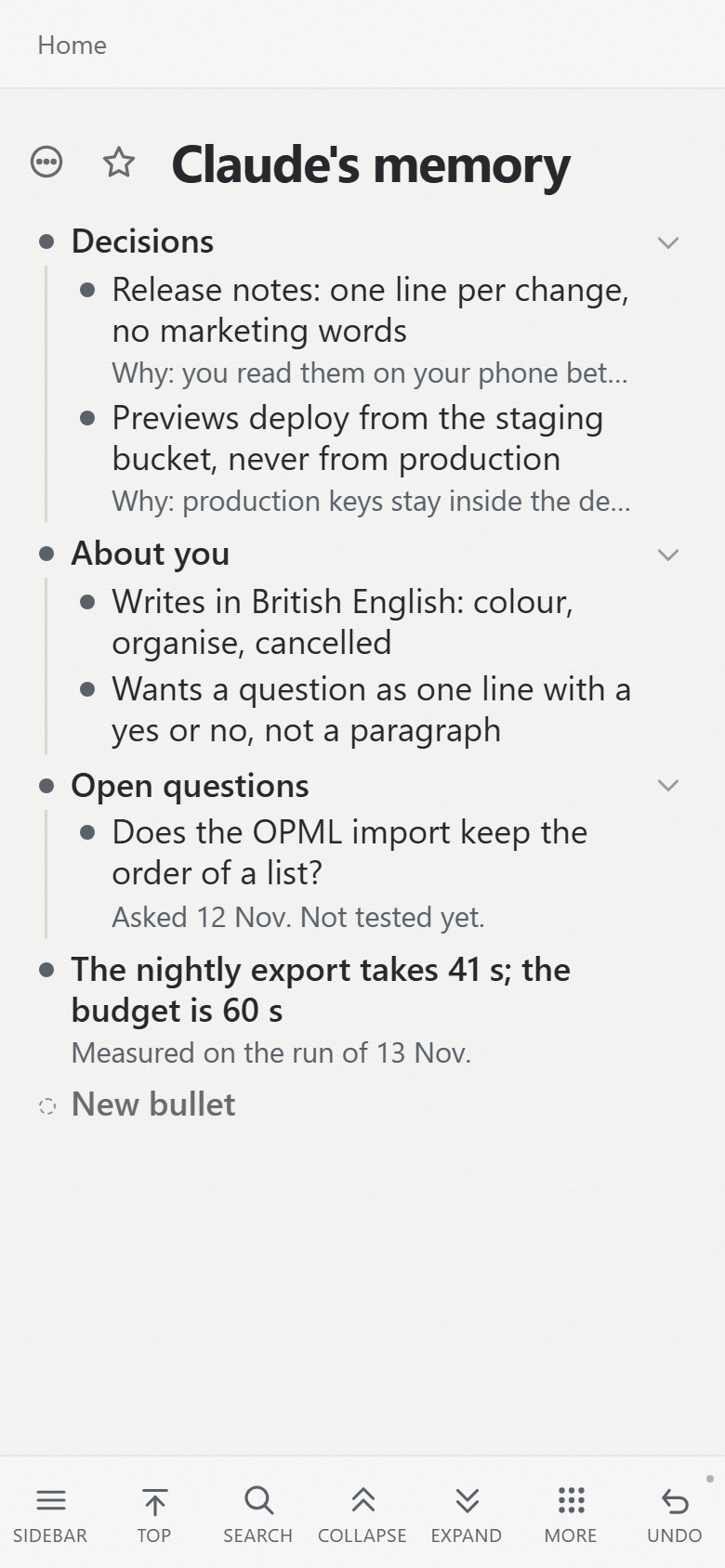
Pando's MCP server is hosted at https://pando.ink/mcp, so those reach it while your computer is off. You connect it once, choose read and write or read only, and Claude keeps what it learns in a bullet called "Claude's memory", which you can read and correct on your phone.
Three options in one table
| Pando | Logseq OG | Logseq (database) | |
|---|---|---|---|
| Where notes live | Pando's server | Markdown files on your disk | a database graph, in beta |
| Open source | no | yes, AGPL | yes, AGPL |
| New features | yes | no, maintenance only | yes |
| MCP server | hosted, 12 tools | no official one; community servers run locally | official, on your computer |
| Phone | the web app, installable | Logseq's own apps | Logseq's own apps |
| Price | free up to 5,000 bullets, then Pro | free | free |
Moving in, or using both
In Logseq OG your pages already are Markdown files, and Pando reads Markdown. Open a bullet's menu in Pando, type "import", choose "Import a file…", and you see what will arrive before anything is written. Logseq's TODO and DONE markers arrive as words, because Pando makes a checkbox only from Markdown's [ ] and [x]; Moving into Pando has the details and the fix.
You do not have to move at all. Keep Logseq OG for the graph you think in, and give your agent its own branch in Pando, where it can work while your laptop is shut. Give your agent a memory shows what that branch looks like after some use.
Sources, read on 14 November 2026: Logseq's releases on GitHub (github.com/logseq/logseq/releases), the announcement "Big update: Logseq is splitting into two versions" of 24 April 2026 on logseq.io, Logseq's DB changelog post of 27 September 2025 on its forum, the license fields of the Logseq and Logseq OG repositories, and the README of ergut/mcp-logseq. Claude's connector directory had no Logseq entry that day.
If an agent that reaches your notes from anywhere is what you are after, create a free Pando account and connect Claude and try it with one branch first.