Pando vs Notion for a Claude that works in your notes
by Andreas Tissen · · updated
Notion's help page on its MCP server says this about the connection Claude gets: "MCP tools act with your full Notion permissions. They can access everything you can access." So if you connect Claude to Notion to keep notes on one project, it can also read and edit every other page your account can open. I looked through Notion's help centre and developer docs for a setting that makes the hosted connection read-only or narrows it to one page. I did not find one.
This page compares Notion with Pando, an outliner I build and run, for somebody choosing where Claude, ChatGPT or Claude Code should read and write notes. It looks at how far the agent reaches, where its memory ends up, and the price. The Notion facts come from Notion's own pages and Claude's connector directory, all read on 14 November 2026.
What an agent in your notes needs
MCP is the protocol Claude and ChatGPT use to talk to other apps. An agent that works in your notes over MCP needs permissions you can narrow to read-only or to one project. It needs somewhere to write down what it learned, so that a decision from Tuesday is still there on Friday. And you need a way to read that and fix it when it is wrong.
Both Notion and Pando run a hosted MCP server, so both work from claude.ai and from the Claude phone app without any computer of yours switched on. Which notes can Claude reach from your phone? explains why that matters.
How far Notion's connection reaches
Notion's server sits at https://mcp.notion.com/mcp, and its developer docs say it "works on every plan". The OAuth metadata it publishes lists one scope for a person connecting, called default. Neither the help page "Notion MCP" nor the developer guide "Get started with MCP" describes a read-only connection or one held to a single page. Enterprise admins get other controls: Notion's help lists approving which MCP clients may connect and blocking tools that are not approved.
There is an older route that does allow it. Notion's API lets you create an internal integration, give it only the "Read content" capability and share single pages with it. Notion's own open-source MCP server (github.com/makenotion/notion-mcp-server) takes such a token and runs on your computer. Its README says it is "no longer actively maintained or supported". It points to the hosted server instead. So a read-only agent held to one page is possible in Notion, but on a local server Notion no longer maintains, and not from Claude on your phone.
A key that needs no browser, for a script or a scheduled Claude Code run, is an MCP token in Notion. The developer docs say those come on the Business and Enterprise plans, and that only workspace owners can create them.
The two side by side
| Pando | Notion | |
|---|---|---|
| Shape | one outline; indenting is the structure | pages, and databases with properties and views |
| Hosted MCP server | yes, https://pando.ink/mcp, 12 tools | yes, https://mcp.notion.com/mcp, 69 tools listed in Claude's directory |
| In Claude's connector directory | no, you add it as a custom connector | yes |
| Read-only connection | yes, chosen on the consent page | not on the hosted server; with an API integration on the old local server |
| Held to one branch or page | yes, one press after you connect | not on the hosted server; per shared page with an API integration |
| Key without a browser | on every plan, from Agents and API keys | MCP tokens on Business and Enterprise, made by a workspace owner |
| Where the agent's memory lives | a bullet in your outline, "Claude's memory" by default | memories and skills stored in Notion, per Claude's directory listing |
| Free plan | 5,000 bullets, every feature, no card | unlimited blocks for one person; Notion AI as a trial |
Where Notion wins
Notion is a workspace for a team: teamspaces, databases with views, page history of 7 days on Free, 30 on Plus and 90 on Business, and Enterprise controls over which AI clients may connect. Pando has none of that.
Its MCP server also does far more. Claude's directory lists 69 tools for it on 14 November 2026, from database views to comments and meeting notes. Pando's 12 tools (remember, recall, shared_with_me, tree, search, create, update, move, mirror, delete, changes and whoami) work on bullets. Pando has no databases and no comments, so an agent cannot use either there. Notion is also in Claude's directory, so adding it is one click, where Pando is a custom connector you paste an address into.
Notion keeps agent memory too. Its directory entry says your agents can store memories and skills in Notion, and one of its tools is notion-memory-search. If your team already lives there, that memory sits next to everything else the team knows. And for one person, Notion's free plan has no block limit, where Pando's stops new bullets at 5,000.
What Pando does differently
Pando is an outline: bullets inside bullets, and any bullet can be opened as its own page. When you connect Claude, the consent page offers two levels, "Read and write your outline" or "Read your outline only", and a box "Give it a bullet to remember in". With read only, the agent can still write in its own memory bullet and nowhere else.
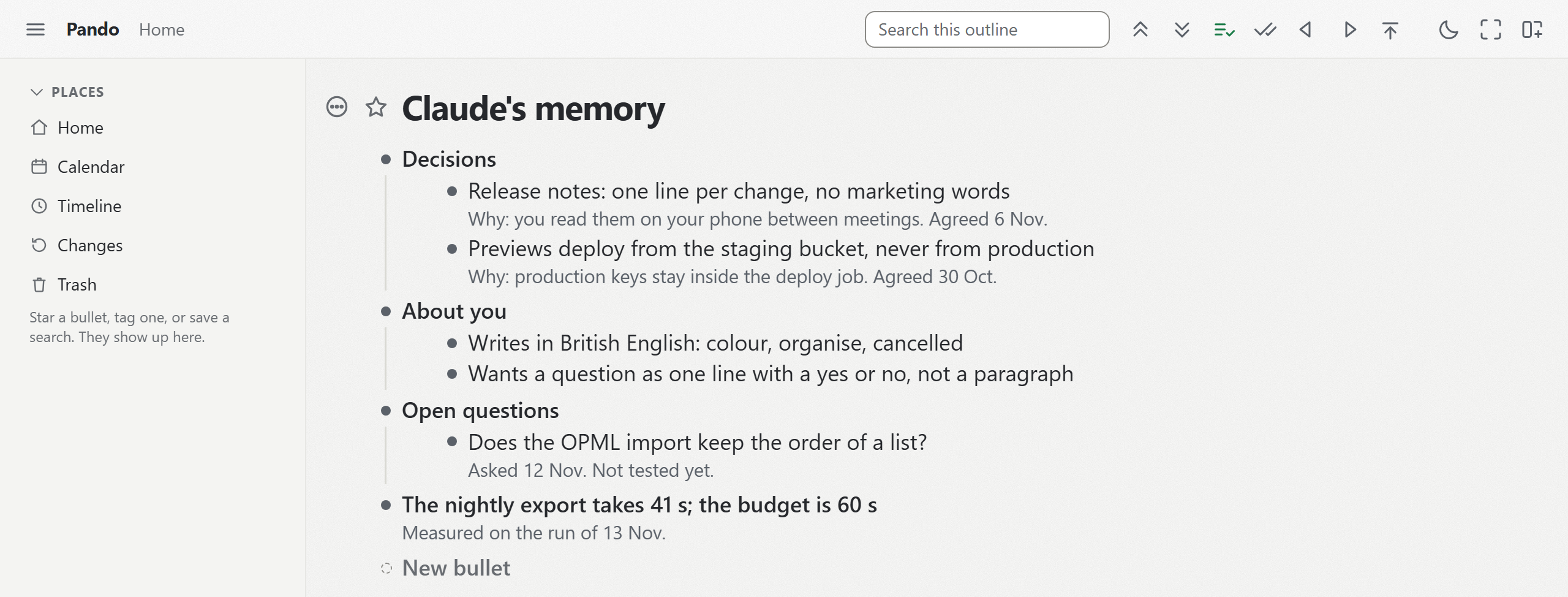
That memory is a normal bullet under Home, called "Claude's memory" unless you rename it. You read it, fix a wrong line or delete one, at your desk or on your phone, because the phone runs the same web app. Give your agent a memory shows what an agent writes there.
After you connect, you can hold the agent to one branch. Open a bullet, open Settings, then "Agents and API keys", tap the agent, and press "Let it reach only", which names the bullet you are in. From then on it reads and writes that branch and nothing else. The branch you share with your agent walks through it.
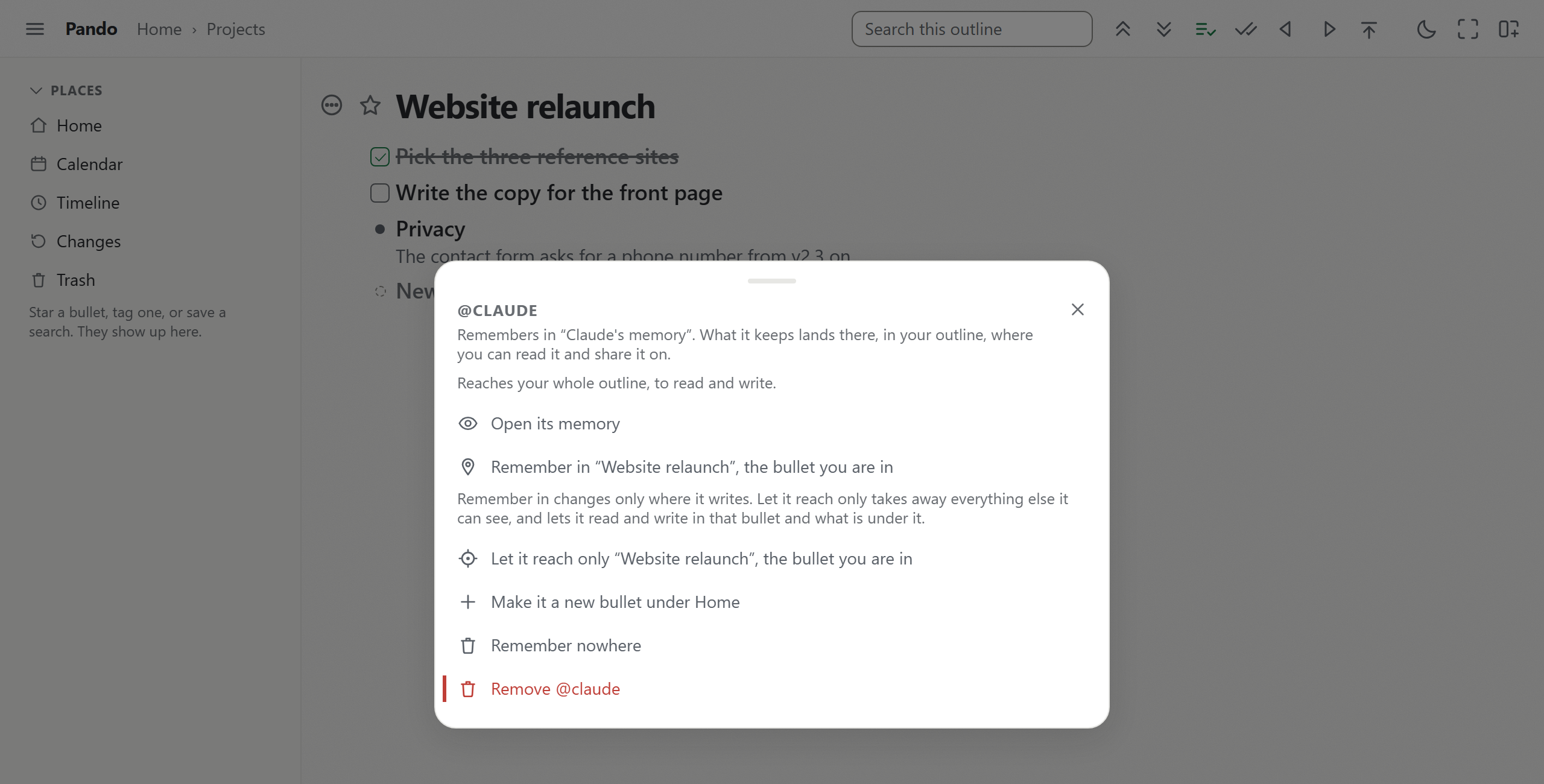
Keys without a browser are on the free plan. An agent you create under "Agents and API keys" gets its own key, which you put in a Bearer header for Claude Code or a script. That key does not expire by itself, so treat it like a password. It can do exactly what its agent may do: read and write or read only, the whole outline or one branch. The agent's "Remove" button in the same panel ends it after one more question. Other agents keep their keys. A Claude connection stays until you remove it there in the same way.
Pando is run by my company, Pyfio UG, in Soltau, Germany, and its privacy page names Cloudflare as the host of the data. If you want out, "Download everything" in Settings gives you the whole account as Markdown, OPML, a spreadsheet or formatted text. A nightly backup can also go to your own Dropbox or Google Drive.
What it costs
Notion's pricing page, read from Germany on 14 November 2026, shows Plus at 9.50 EUR and Business at 19.50 EUR per member a month, and says paying yearly saves up to 20%. Notion Agent and AI meeting notes come with Business, and Free and Plus get a trial of Notion AI. Custom Agents are free to try, then $10 per 1,000 Notion credits a month.
Pando costs nothing up to 5,000 bullets and 3 EUR a month past that.
When Notion is the better home
Stay if your team's knowledge already lives in Notion, if you need databases, or if you want the widest set of agent tools. Your Claude already works there, and adding it from the directory takes a minute.
Use Pando if you want to hold an agent to read only or to one branch, and to read its memory as part of your own outline. The two also work side by side: keep the team wiki in Notion and give your agent its own branch in Pando. A Notion export in "Markdown & CSV" is a zip of Markdown pages and CSV files, and Moving into Pando says what Pando's importer does with them.
Notion pages used here, all read on 14 November 2026: the pricing page (notion.com/pricing), the help pages on Notion MCP and on exporting, the developer guide "Get started with MCP", the developer reference on capabilities, the OAuth metadata at mcp.notion.com/.well-known/oauth-protected-resource, the README of makenotion/notion-mcp-server on GitHub, and the Notion entry in Claude's connector directory.
To try it on your own notes, create a free Pando account and connect Claude. The page gives you the address and each click in Claude, and the consent page lets you pick read and write or read only.