The project brief that fits in five bullets
by Andreas Tissen · · updated
Pick the project on your list that has been open the longest. Try to say in one sentence each what done looks like, who decides when it is done, and what happens if it never gets done at all. If one of those takes a paragraph, the project probably has no clear end, and adding tasks will not give it one.
Five short lines fix that, written before the first task. In Pando, the outliner I built, they are the first five bullets under the project, so you read them every time you open it, and so does Claude when you hand it the project.
Five bullets
Write these under the project before anything else. It takes a few minutes. The example is the project in the picture further down, called "Launch pricing".
- Done looks like: one sentence in the past tense that somebody else could check. "The pricing page is live with two plans and a working checkout" passes. "Pricing sorted" does not.
- Not doing: the two or three things people will assume are included. Here: annual invoicing, team seats, a free trial.
- Who decides: "Alex on prices, me on everything else". On a personal project it is usually you, and writing it down still shows which decisions wait on somebody else.
- First real step: something that changes something, such as "write the two prices into the billing tool". "Plan the project" does not count.
- If this does not happen: one line. "No revenue this quarter" is a real answer.
The last line sorts your list. If the honest answer is "nothing much", the project belongs on a someday list rather than on the active one.
Why Not doing earns its line
Not doing feels unnecessary while you write it, because everything on it seems obviously out. Scope grows during a project when that boundary was never written down, since every new idea then sounds as if it was part of the plan from the start.
Basecamp's Shape Up (Ryan Singer, 2019) asks for the same thing in its pitches under the name "no-gos". Once the boundary is written, an addition turns into a question you answer out loud: the free trial is on the Not doing line, so do we change that? Sometimes the answer is yes. Then you write the date and the reason into the line's note.
A brief in a separate document
A brief kept in a separate document gets read once, at the start, and in week three somebody suggests the obvious extra feature, nobody opens the document, and the free trial is suddenly half built.
The brief only works if it is in front of you when the suggestion arrives. It also has to change in the open: if the scope moved on the fourteenth, the brief should show that it moved and why, so that the post-mortem at the end compares the result with what was actually agreed.
The brief above the tasks
In Pando the five lines sit under the project bullet and the tasks grow below them, so opening the project means reading the brief first.
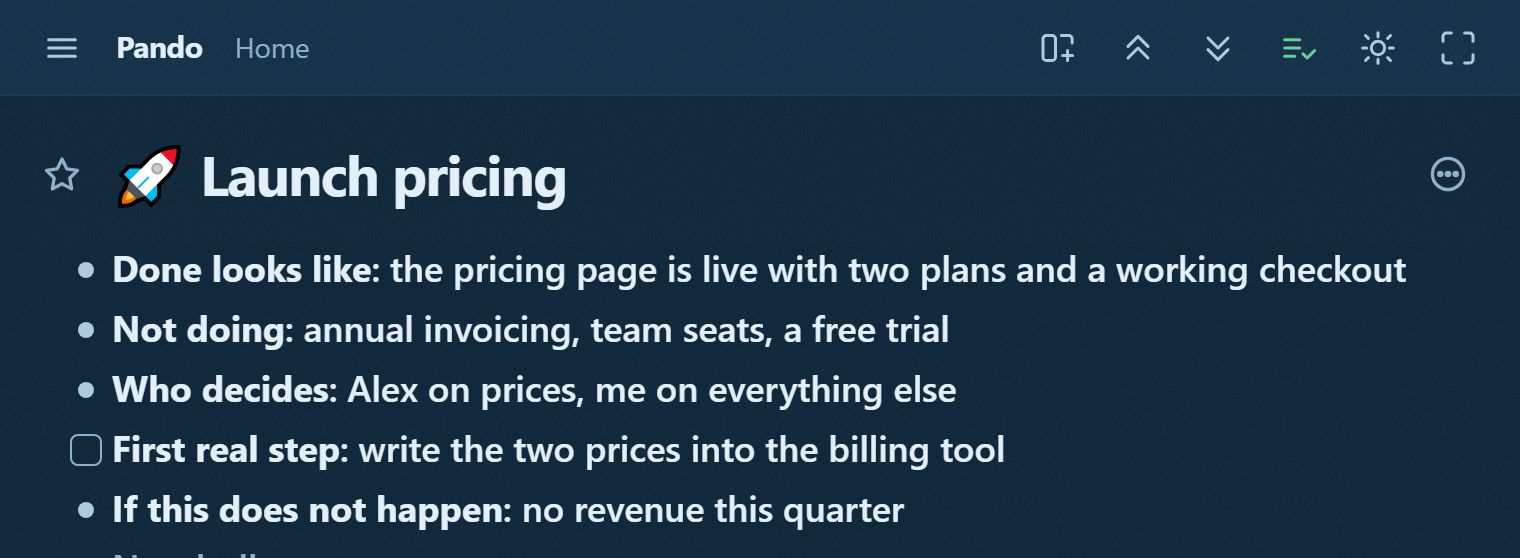
The first real step is a checkbox, because it is the first task, and when reality changes you edit the line where it stands and add the date and the reason to its note, so the moved boundary stays visible. For the next project you copy the bullet with everything under it.
The same five lines, as placeholders with a note on how to fill each, are in the project brief template. Opening the link shows the branch read-only; the Show in my Pando button there copies it to the top of your Home once you have an account.
Handing the project to Claude
Pando speaks MCP, the protocol Claude uses for outside tools, so a connected Claude can open the project bullet itself. You point it at "Launch pricing" and say "work on this". It reads the five lines before the tasks. Done looks like and Not doing give it something concrete to work from, and an agent that has read Not doing is less likely to offer the free trial you already ruled out.
When it hits a question only you can answer, such as a price, Claude can write that question into your outline as a checkbox addressed to you. You tick it or answer in its note, and Claude reads the answer on its next pass.
Pando is free up to 5,000 bullets with every feature, agents included; Pro is 3 EUR a month. To give Claude your next project with its brief attached, create a free account and connect Claude.