Two agents, one tree: Claude in the app and Claude Code at the desk
by Andreas Tissen · · updated
Several Claude agents build Pando, the outliner I make, and they coordinate through a board in my outline. Here is a made-up example of the problem. On the train you agree with Claude, in the phone app, that the newsletter goes out on Thursdays from now on. In the evening Claude Code on your laptop sets up the sending job for Tuesday, because Tuesday is what the notes in the repository say.
Start with the file you already have
If both agents are Claude Code, or Claude Code and another coding agent, working in the same repository, you probably need nothing new. Anthropic's page "How Claude remembers your project" (code.claude.com, read on 14 November 2026) says Claude reads CLAUDE.md "at the start of every session", and that it can read an AGENTS.md instead when a repository already uses that file for other coding agents. Put a short list of decisions in that file and commit it, and every session on every machine that checks out the repository starts from the same list, without any instruction from you.
That stops working in two cases. The Claude app on your phone and ChatGPT cannot read your repository, so a decision made in a chat never reaches the file unless you copy it in yourself. The newsletter day is the other case. It is not about code at all.
A shared branch both read first
For those cases, keep the shared decisions in one branch of an outline that every agent can reach. Each decision is one line with its reason in the note: "Newsletter goes out on Thursdays", and under it "Why: most replies came on Thursday mornings. Agreed on the train, 12 Nov." An open question waits in the same branch until somebody answers it.
What belongs to one agent stays out. Its working notes and half-finished thoughts go into its own bullet, so neither agent has to read the other's scratch work.
Both agents get the same instruction: "Read the shared branch before you start. Never rewrite a decision somebody else wrote; add your own line, or move the old one to the open questions with what changed."
What that instruction can and cannot do
The instruction is a request. As the post on sharing one branch explains, a prompt does not enforce anything, and an agent may skip the reading on a day when it decides it knows enough. Pando cannot force an agent to read a branch first.
What the layout does give you is visibility. If an agent breaks the rule, you get two lines that contradict each other. They sit in a branch you can read on your phone. You see the conflict before the newsletter goes out on the wrong day, and you decide which line stays.
What happened in my own setup
The agents that build Pando are separate Claude Code processes. One walks the product and files defects as cards; another takes a card and fixes it. They never message each other. Apart from the code itself, what they know of each other's work comes from a board in my outline, with lanes for open work, work in progress, done, and questions for me.
It has failed in instructive ways. On 30 August 2026 I asked whether anything ever read the lane where the agents put their questions to me. Nothing read it. My answers sat on the cards until I happened to send the agent a link to the card. A day later the opposite went wrong. An answer I had written that morning was taken as the answer to a different question the same card asked later that day.
Both fixes went into code. The script that runs the agents now reads my lane before every run, and it only counts what I wrote after the card last arrived there. Code is the better place for a rule that everything depends on. Between the Claude app and Claude Code, though, there is no program of yours that starts both agents and could enforce such a rule, so the shared branch and its visible contradictions are what you can rely on.
Two ways to share in Pando
Each agent you connect gets its own memory bullet. It sits under Home, named after the agent ("Claude's memory"), and the agent writes it with the remember tool. The shared decisions can go in two places. You can make a branch called "Shared ground" and tell both agents to read it first; any connection with read and write reaches it. Or you point both agents at the same memory bullet, under Settings, "Agents and API keys", with "Remember in" on the second agent's row; then recall finds the same decisions for both. I would start with the second. The decisions then turn up whenever either agent calls recall, and there is no second place it has to remember to read.
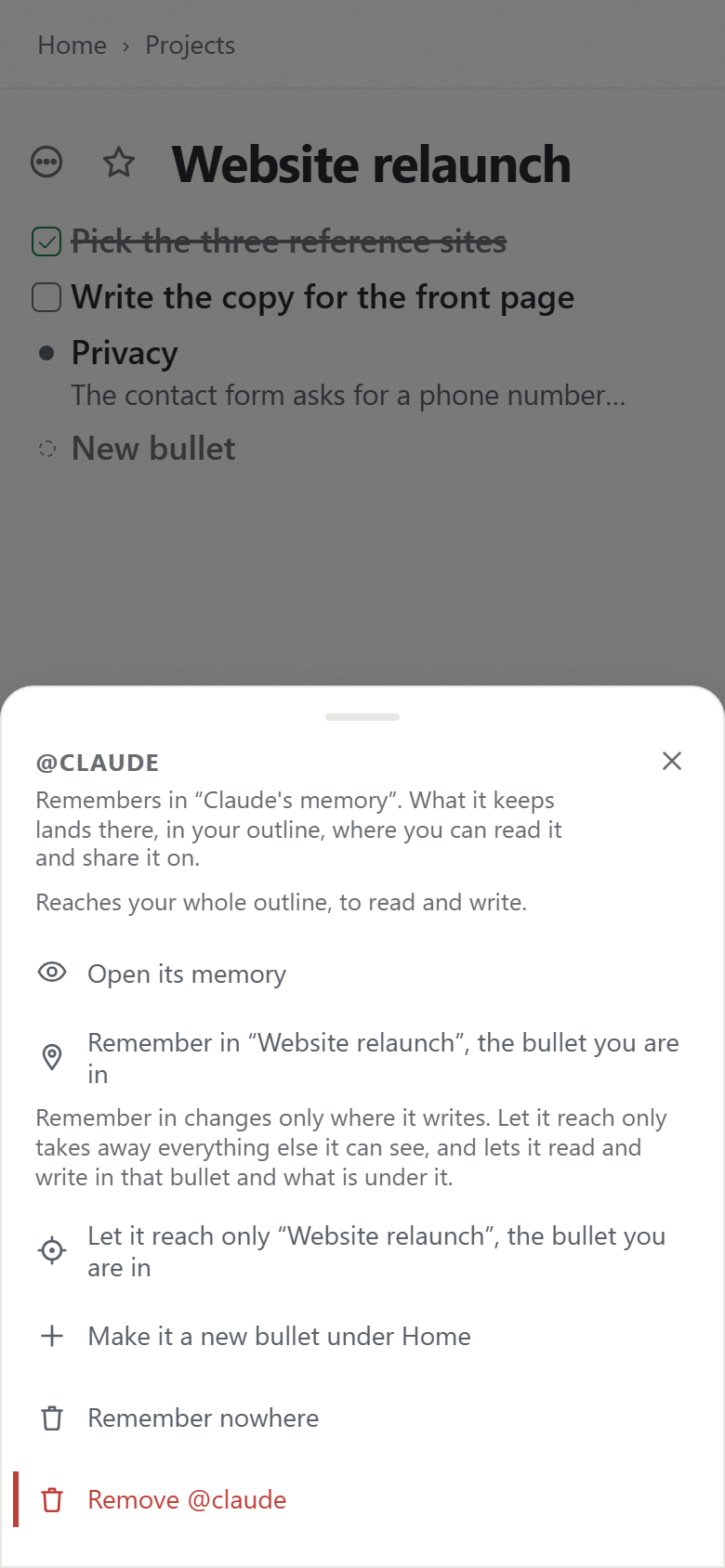
Agents that come back to a large tree can ask what changed since they last looked, which is the subject of never re-read what you have already read. The layout with Shared ground and one branch per agent is also a template, with the prompt both agents receive.
A second agent costs nothing extra; agents are part of the free plan. Create a free account and connect Claude, then connect Claude Code from the same page and point it at Claude's memory.