Moving in: the file decides how much survives
by Andreas Tissen · · updated
You press export and you get a zip. Three hours later you are retyping the parts that did not make it, and the worst of it is that you cannot tell which parts those were.
The export button is never the hard part. Every tool on this list has one. What decides your afternoon is the shape of what comes out, and that is the thing nobody checks first. So here is the check, and the honest list of what stays behind.
The three grades of file
The tool you are leaving matters less than the format it hands you. There are three grades, and you can tell which one you have before you start moving anything.
| What arrives | Who hands you one | |
|---|---|---|
| One OPML file | The whole tree: nesting, notes, ticked items, and the marks inside a line | Workflowy, Dynalist, RemNote, Checkvist, OmniOutliner, Logseq, and most mind-mappers |
| Markdown, CSV or TSV | The shape and the words, one file per press | Obsidian, Roam, Bear, Craft, Apple Notes, Amplenote, Google Docs, and any spreadsheet |
| A zip, or the vendor's own JSON | Nothing at all, until you unpack it yourself | Notion, Roam, a Logseq graph export, Tana, Standard Notes |
Several names appear twice, because the export dialog offers a choice and the choice is the whole decision. If the tool you are leaving can write OPML, pick OPML and stop reading this table.
What an OPML brings across
The shape is the easy part: nesting, at whatever depth you built it. The notes come with it, under either spelling of the attribute, so a file from Workflowy and a file from Dynalist of the same tree arrive the same. Ticked items arrive ticked.
Marks inside a line become Pando's own markup: bold, italic, underline, strikethrough, highlight, inline code and links. A formatted bullet is still a formatted bullet, tags and dates on the line included.
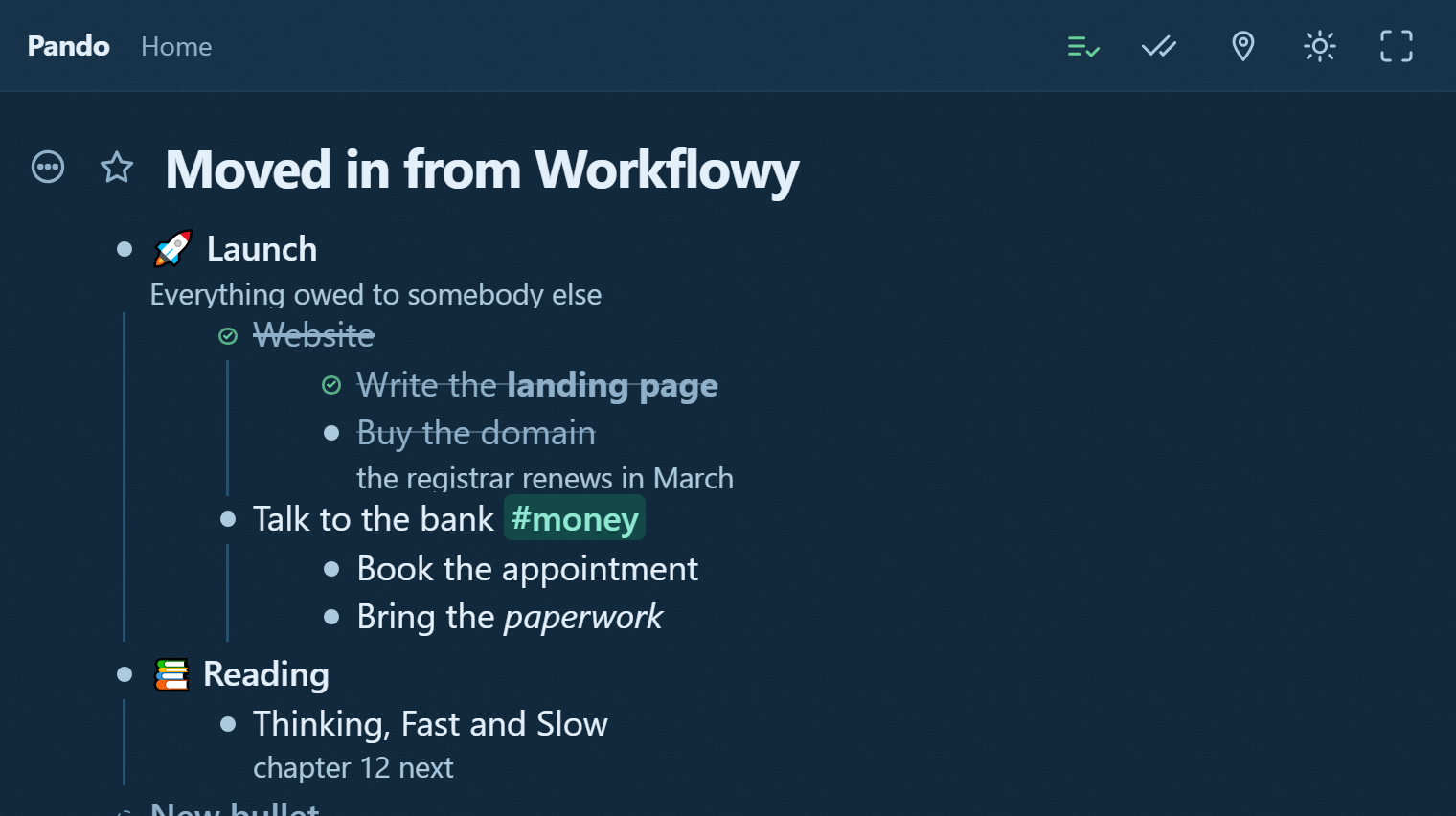
One thing no format carries is the day you actually finished something. A ticked item arrives ticked and dated the day you imported it, which is the only date anybody knows.
The part I have to say out loud
A mark can still lose to a word. Pando would rather drop a colour than drop a word, and once in a while it does: <b>Plan</b> #work keeps its bold, but a bullet whose tag runs straight into the marked words with no space between them, #work<b>x</b>, arrives as plain #workx, because writing that one back would move where the tag ends. The words are never the part that goes.
Images do not come. Nothing is ever fetched from your old tool.
Your bullets get new addresses. Every imported bullet is minted fresh, so a link you made from one of your own bullets to another stops pointing anywhere, and a mirrored bullet arrives as two ordinary copies.
And the furniture stays behind: which branches were folded, who you shared what with, and when anything was created.
Markdown, and one file at a time
Nothing here unzips. That is the real cost of every migration on the list except the ones that hand you an OPML: you unpack the archive yourself and bring pages in one press at a time. A four-hundred-note vault is four hundred presses, and if that is your situation, bring the branch you are working in and leave the archive where it is.
Markdown from Obsidian arrives best of the three grades. Headings become headings, - [ ] becomes a real to-do, - [x] a finished one, and a numbered list stays numbered. Logseq and Roam keep their shape, but their own markers arrive as words: TODO Call the bank comes in as a bullet reading "TODO Call the bank". Replace TODO with [ ] and DONE with [x] in the file before you import it, and they arrive as real to-dos instead.
Two traps worth one sentence each. Text indented with tabs is read as a spreadsheet, because tabs on most lines are what a spreadsheet looks like. Text indented with spaces and no bullet markers loses its children into the note of the line above, and says how many it did that to.
The two imports nobody asks for
Kindle's clippings file and a Readwise export are first-class readers, not accidents. The book becomes the parent, the highlights become its children, the location goes in the note, and two highlights of the same passage collapse to the longer one. That is most of reading notes nobody reads done before you start.
The reach is wider than the outliners, too. OPML is what the mind-mappers write, and CSV is what every task manager and every spreadsheet writes.
Before you press it
It tells you what it found before it writes anything: the file, the format it settled on, how many bullets, and which bullet they will land under. Warnings are printed there, in red, while there is still nothing to undo.
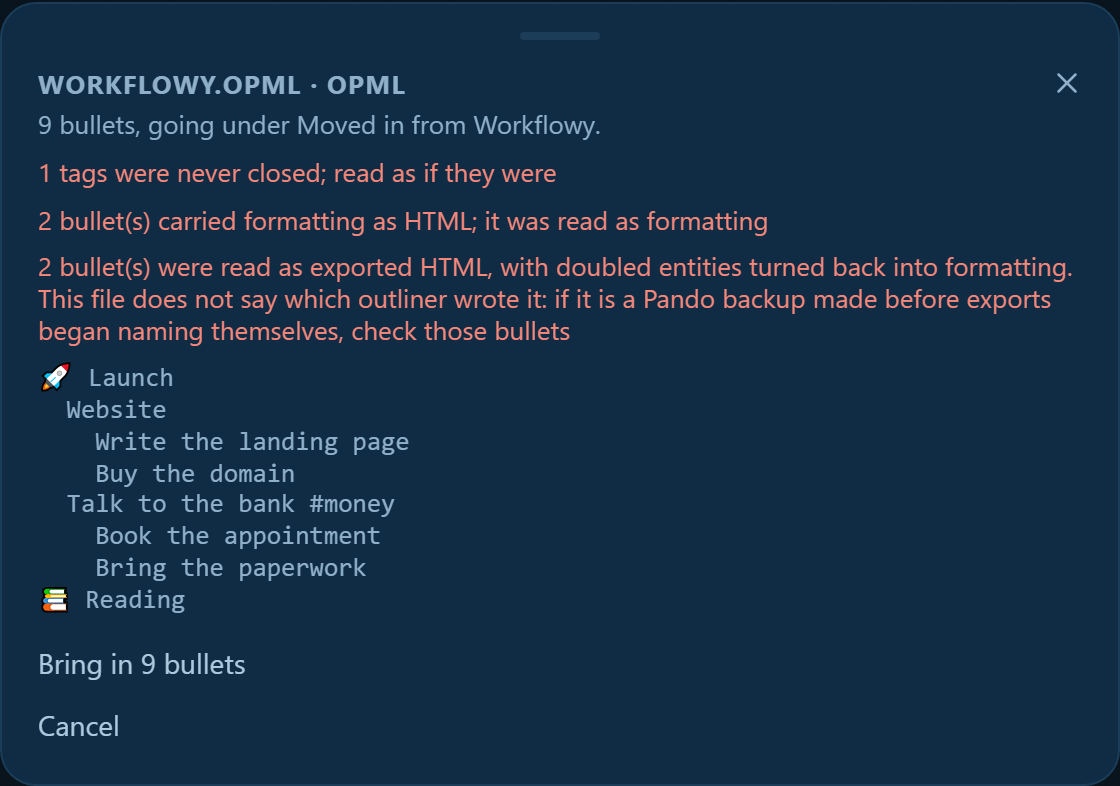
A file that is not text is refused rather than turned into bullets of noise. A large file goes in as a run of small saves, and the button says so: "24,001 bullets, in 61 pieces. Ctrl+Z takes them back out a piece at a time."
Try one branch before you move the house
Export one branch, not your life. Bring it in, look at what happened to it, and decide with a real tree in front of you rather than with my table. The way out is the same set of formats as the way in, so the trip is reversible in both directions.
If you are coming from one of the two most likely places, the longer comparisons are Pando against Workflowy and Pando against Dynalist.
Open Pando and import one branch.