The branch you share with your agent
by Andreas Tissen · · updated
Two things go wrong when you give an agent real work. Either it cannot reach what it needs, so every task begins with you pasting context. Or it can reach everything, and you find yourself hoping it behaves. Hope is not a security model.
The first comes from a missing place for the collaboration, one you can see. The second comes from a missing lock.
Three parts, one branch
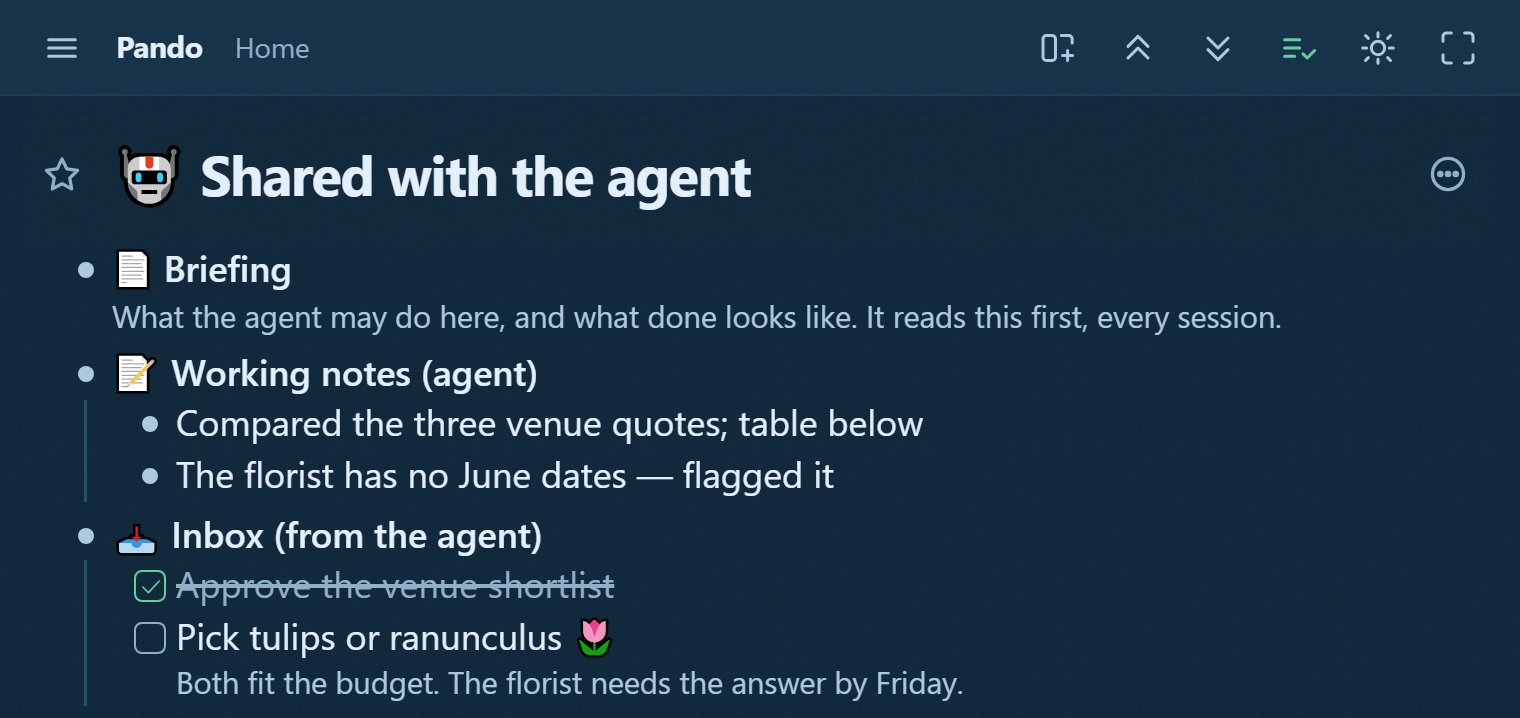
Make one branch for your agent and give it three children.
Briefing is what the agent may do here, in your words. In most tools this would be a system prompt buried in a settings page; here it is bullets, and you can edit bullets the moment the rules change. "File captures under their projects. Never delete. Never touch a protected bullet."
Working notes are the agent's own. What it did, what it could not decide, what it noticed. This is the difference between an agent that repeats a mistake weekly and one that recorded it once.
Inbox (from your agent) is where it puts what it needs from you, as checkboxes you tick. That pattern has its own post. The short version: a request in a chat scrolls away, and a checkbox does not.
Why permissions stop being scary
The branch is where the two of you work. The lock is the boundary for changes; it hides nothing from reading. A connector you approve, from Claude, ChatGPT or anywhere else, starts with your whole outline; you choose read and write, or read only. Protect a bullet and it refuses every change from every agent, everything under it too. That is a different animal from a rule you hope it follows. Revoke the connector in one press and its next request is refused.
For a narrower reach, hold it to one bullet. Open that bullet, open Agents and API keys in Settings, tap the agent's row under Your agents, and press "Let it reach only", the button that names the bullet you are in. From then on it reads and writes that bullet and everything under it, even if you approved it read only, remembers there, and reaches nothing else. Its row then says it reaches that bullet "and nothing else in your outline". An agent you create there with both of its boxes unticked, "Let it read and write this outline" and "Give it a bullet of its own to remember in", reaches nothing until you make the same press. Its key works in clients that send a Bearer header, such as Claude Code or Cursor. ChatGPT cannot send one, and the Claude apps only through a custom connector's Request headers, a beta Anthropic offers to a limited set of organizations.
That makes the interesting move safe. Hold the agent to ONE project, nothing beyond it, or approve Claude read only, and watch what it does for a week before you widen anything. You build trust on evidence, not on configuration.
Why it stops being amnesia
Everything the agent learns lands in Working notes, and Working notes survive every session, because a bullet in a real outline is not a context window. When the agent is wrong, you fix the NOTE. Every future session inherits the correction.
There is a second effect worth naming. Because you can read the notes, you find out what your agent misunderstands. That is normally invisible. It is usually the most useful thing on the page.
The rule of thumb after a month of this
Judgement goes in the Briefing. Memory goes in Working notes. Asks go in the Inbox. Anything that does not fit those three is usually a task that should have been a bullet somewhere else in your tree.
Take the branch
Open the template, press "Show in my Pando", then point your agent at that branch (a connector on your whole outline already reads it; for an agent held to one bullet, make this the bullet it remembers in) and tell it one sentence: "Read the Briefing before you work, keep Working notes, and put anything you need from me in the Inbox as a checkbox."