ChatGPT in a browser reaches your laptop only through MCP
by Andreas Tissen ·
ChatGPT in a browser tab has one way that OpenAI documents to reach a program on your laptop: run an MCP server there and open OpenAI's Secure MCP Tunnel to it. So to reach your CLI from the tab, you wrap it in MCP.
This year three "drop MCP for the CLI" posts drew 447, 400 and 330 points on Hacker News, and none of the three mentions a chat app or a phone. One gives people without a terminal a single line. In a terminal their case is strong, and below I give it its best numbers, with the fine print its own sources attach. But the person in the ChatGPT tab, or holding the Claude app, has no terminal the chat can reach. For them a hosted server is the road the chat app itself signs them in on, and remembers, with no computer of theirs left switched on.
I make Pando, which runs one of those servers; where it fits comes last.
The case for the CLI, at its best
Eric Holmes made it most plainly, on 28 February 2026, in "MCP is dead. Long live the CLI": "I'm convinced MCP provides no real-world benefit, and that we'd be better off without it." His reasons are good ones. Models already use command-line tools well. Commands compose, one piped into the next. When one fails you run it yourself and see why. And a CLI reuses the login you already have on that machine. His advice to anyone building a tool: "Ship a good API, then ship a good CLI. The agents will figure it out." On Hacker News that post drew 447 points and 284 comments, under a thread title that now reads "When does MCP make sense vs CLI?"
He adds the pain of daily use. Local MCP servers are processes, and they "need to start up, stay running, and not silently hang". "Initialization is flaky." "Re-auth never ends." And "Permissions are all-or-nothing": Claude Code can allowlist an MCP tool by its name and no finer, while with a CLI "I can allowlist gh pr view but require approval for gh pr merge."
The sharper half is tokens, and it comes with numbers. A post by Chloe Kim on Quandri's engineering blog, undated and submitted to Hacker News on 29 May, estimated its own stack from character counts: 4 MCP servers with 77 tools at about 21,077 tokens, 10.5% of a 200,000-token window. mcp2cli, a Show HN of 9 March, promises 96 to 99 percent fewer tokens spent on tool schemas every turn. In its writeup, a task manager with 30 tools cost 54,525 tokens over 15 turns through MCP, and 2,309 through the CLI. Quandri adds speed: a Jira benchmark in which the MCP server "was 3x slower per call, and 9.4x slower on first call including initialization" than the REST API underneath it, a cost it calls architectural, because "every MCP server adds a process layer between the LLM and the underlying API".
Both token numbers carry fine print. To their credit, both sources print it. mcp2cli's baseline puts every tool schema into every turn with no deferred loading, and against a small API of 5 endpoints the saving shrinks to 68%. The same writeup puts Anthropic's Tool Search, which loads a schema only when it is needed, at about 85%, and says why mcp2cli still wins: Tool Search is "Claude-API-only", and "Full schemas still enter context". If that 85% held on the 30-tool case, Tool Search would leave about 8,200 tokens against mcp2cli's 2,309. It closes most of the gap, not all of it. Quandri has since added a note that Claude Code's Tool Search "reduces context usage by 85%+", and goes straight on: "The performance, debugging, and architectural arguments below still apply." Under the mcp2cli thread, stephantul named the better measure: "Tokens saved should not be your north star metric. You should be able to show that tool call performance is maintained while consuming fewer tokens."
Where the CLI side is right
Wherever the assistant has a computer to type into. Simon Willison wrote the top comment under the newest of the three threads, on 20 September, and it opens on the MCP side: "This article entirely misses the value that MCP brings today." Then he gives the CLI side its ground: "Sure, there's almost no reason to use MCPs if you are running a full-blown terminal agent (Claude Code, Codex, Meta Muse, OpenClaw etc) with unfettered internet access - just let it call APIs directly." Maharshi Patel, whose post of 14 September started that thread, draws his line in the same place: "Agents with terminal access can replace most MCP servers and often are more capable".
Plenty of assistants have such a computer.
- Claude Code, whose Bash tool "Executes shell commands in your environment", in a terminal, an IDE or the Claude desktop app. Codex CLI and Gemini CLI run commands from a terminal on your own system too.
- The ChatGPT desktop app. On Windows its default agent "runs commands in PowerShell", each chat has a terminal, and it can start local MCP servers from a command.
Claude Desktop's chat is the odd one out. It reaches your computer through local MCP servers, which it starts by running a command or installs as one-click desktop extensions, and Anthropic says those run only in Claude Desktop and Claude Code. So in that chat the choice is a local MCP server or a hosted one, and a CLI runs only inside one of them.
If a terminal is where your assistant works, take the CLI side's advice. I said the same about notes: if your agent is Claude Code and your vault is on the same laptop, you need no MCP server at all.
The chat app has no terminal
Take the computer away.
ChatGPT on the web reaches a tool of your own through developer mode, and developer mode takes remote servers only: a public HTTPS address, or the Secure MCP Tunnel to a server on your own machine. OpenAI's page for the web adds that it "doesn't read local Codex configuration files". A CLI on your laptop is reachable from the tab once you wrap it in an MCP server, leave the laptop on and keep the tunnel open.
Claude's custom connectors are remote MCP servers too, and Anthropic's help page is plain about where the call comes from: "from Anthropic's cloud infrastructure, rather than from your local device. This is true across every Claude client, including claude.ai, Claude Desktop, Cowork, and the mobile apps."
Neither phone app runs anything on a computer of yours by itself. Each can steer one that does. ChatGPT's Remote drives the desktop app on a Mac or a Windows machine that has to be "awake, online, and signed in", and Claude's Remote Control drives a Claude Code session running on your machine. For a developer who leaves a laptop open, that works. It needs the computer awake every time, where a hosted connector needs one at most once, to set it up, and never again.
The CLI side did answer. In the May thread, MatthewPhillips wrote that "CLIs do not run on mobile and never will", and mhalle pointed out that Claude skills installed from the web also run in the phone app. MatthewPhillips asked back: "Can the CLI launch your web browser to do oauth from the skill (on a phone)? And then the credentials are saved where?"
Device flow answers the first half, the way gh auth login does: the CLI prints a code and an address, and you open the address on the phone. The second half is the hard one. The login has to be kept somewhere the next chat can reach, and Anthropic says it limits "the length of time you can use a single sandbox container". So the key either rides along in the skill's own files, or the login happens again. Holmes counts it in the CLI's favour that it reuses the login you already have, and that login sits on the machine the CLI runs on. A chat on a phone runs on no machine of yours. A hosted MCP server answers with a sign-in and a consent page: you approve the chat once, the chat app keeps the token, and nobody types a key. Two of the four things Willison says MCP makes easier are exactly this: "A way to handle authentication that doesn't allow the agent to directly access API keys", and "A sensible UI to allow users to connect and authenticate further services".
ChatGPT still has one older road that skips MCP. Custom GPTs with Actions call a plain HTTP API from the chat. On 11 September OpenAI said it plans "to retire custom GPTs across ChatGPT plans and provide a migration path to plugins", and the tools a plugin brings to ChatGPT on the web are, in OpenAI's words, "remote MCP-backed tools". The road both chat apps keep building is a hosted MCP server.
The comments got there first
Holmes never mentions this case, the mcp2cli writeup assumes a shell, and Patel fences the case off with "agents with terminal access". The comments under all three went straight at it. Under Holmes' post, the top-level comments ranked second, third and fourth all raise it. tartieret, in second place: "It seems that the author thinks that AI use is limited to developers". buremba, third: "CLIs require sandboxing, doesn't handle auth in a standard way and it doesn't integrate to ChatGPT or Claude." Further down, benkaiser: "One key aspect that is missed here, is mobile users. iOS don't have a CLI". Under Patel's post, the second-ranked comment, by docheinestages, asks: "What should all other agents that don't have terminal access do?" Under mcp2cli, rakamotog: non-technical employees "will not move to terminal UX's anytime soon."
The top comment under the May thread came from mxstbr, who says he runs the team at OpenAI responsible for the ChatGPT App Store and all things MCP. His point is about supply: "Most of these companies don't have a CLI. Many of these companies don't even have an external API!"
Two of the articles do reach the case, partway. Tom Bedor's "MCP is a fad", of 12 December 2025, discusses non-technical users and says MCP has not reached them yet. That group, he wrote, is "at present, largely theoretical", because "Exposing toolsets to MCP involves editing JSON". His own commenters answered in January: in ChatGPT or on Claude.ai a connector is an OAuth sign-in, and fzaninotto added that "scripting can't beat that". Today adding a custom connector in Claude takes a URL, and the Free plan allows one. Quandri's post names the case outright, in its list of where MCP is still valid: "Non-developer users - MCP is more accessible for those who don't use terminals".
The strongest reply article already drew the line this post leans on. Charles Chen's "MCP is Dead; Long Live MCP!", of 14 March, drew 295 points, more than two of the five threads above, and it faults the debate for "a lack of distinction between local MCP over stdio versus server MCP over HTTP". He defends the server kind for OAuth and central control, and says his case is "primarily relevant for orgs and enterprises". The person with a chat app and a phone is the part his piece leaves to the commenters too.
What a hosted server looks like from the chat
Pando is an outliner with one of those servers. It lives at one address, https://pando.ink/mcp, and nothing of it runs on your computer: the connect page gives you that address and nothing to install.
In Claude, you add the address as a custom connector. In ChatGPT, you add it in developer mode, which you set up on a computer, not on the phone. OpenAI's guide lists developer mode for paid plans, though a Free account connected and wrote a bullet in a test on 23 September 2026. Once Pando was set up there, ChatGPT used it from the phone app the same day. Whether it can also write from the phone, I have not tested yet.
Either chat then sends you to Pando's consent page.
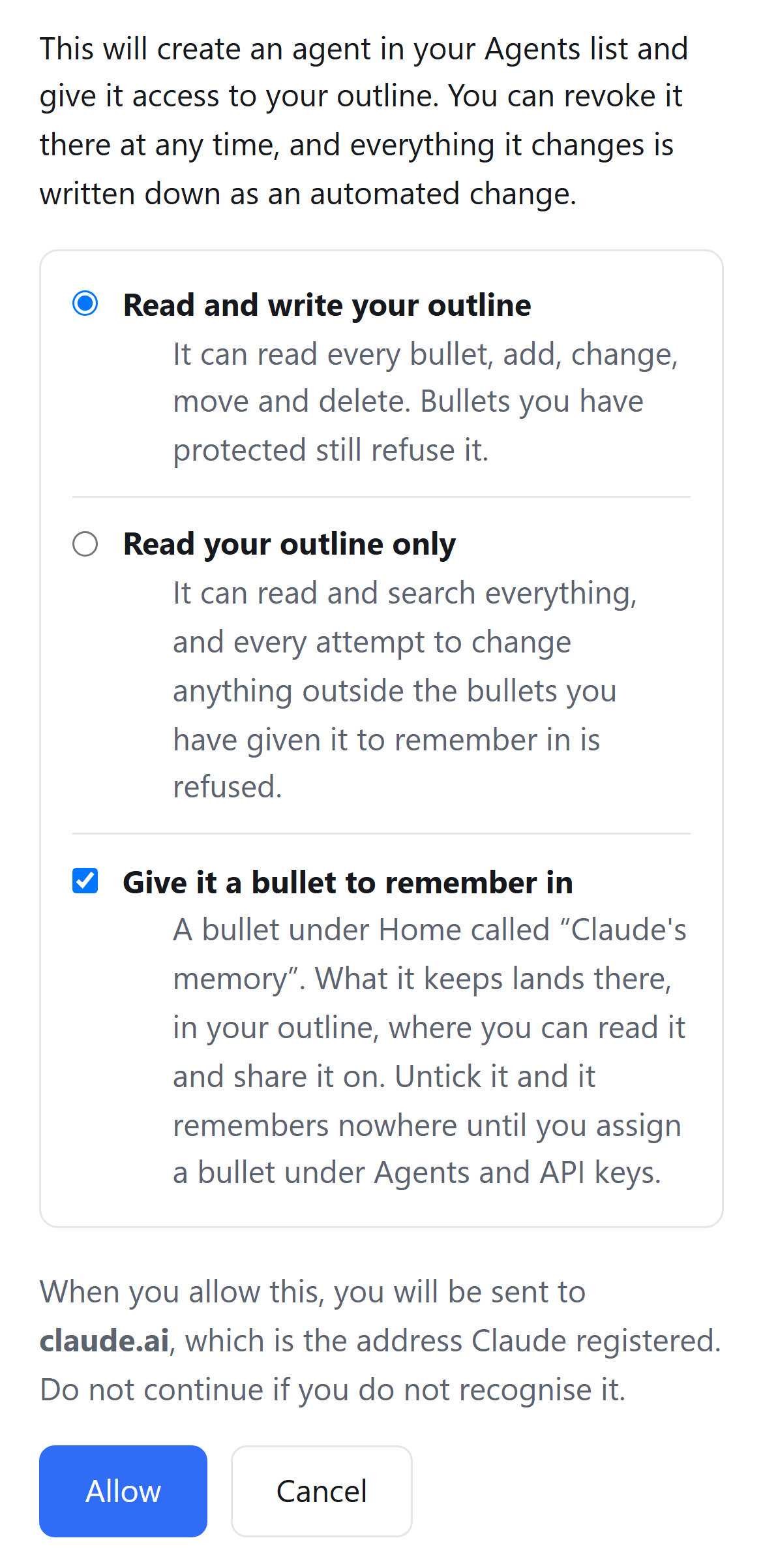
You pick read and write, or read only, and the ticked box gives the assistant a bullet under Home to remember in. It starts with your whole outline. One press on its row in Pando, "Let it reach only", holds it to the bullet you are in, where it can read and write, because remembering is a write; everything else it could see is taken away. Pando runs no model of its own. The thinking is done by the assistant you already use.
Holmes' complaints read differently here. The moving parts and the flaky start are about local servers, processes that have to come up on your machine, and a hosted connector starts nothing there. Quandri's extra layer is real when an MCP server wraps somebody else's API; Pando's server runs in the same worker as its own API, and a tool call never leaves it. Re-auth is one approval per chat app, because Pando's tokens do not expire until you revoke them. And a server can make a tool's name mean something: Pando's six reading tools are marked read-only, deleting a branch is a tool of its own, and ChatGPT treats any tool without that mark as a write, where "Write actions by default require confirmation."
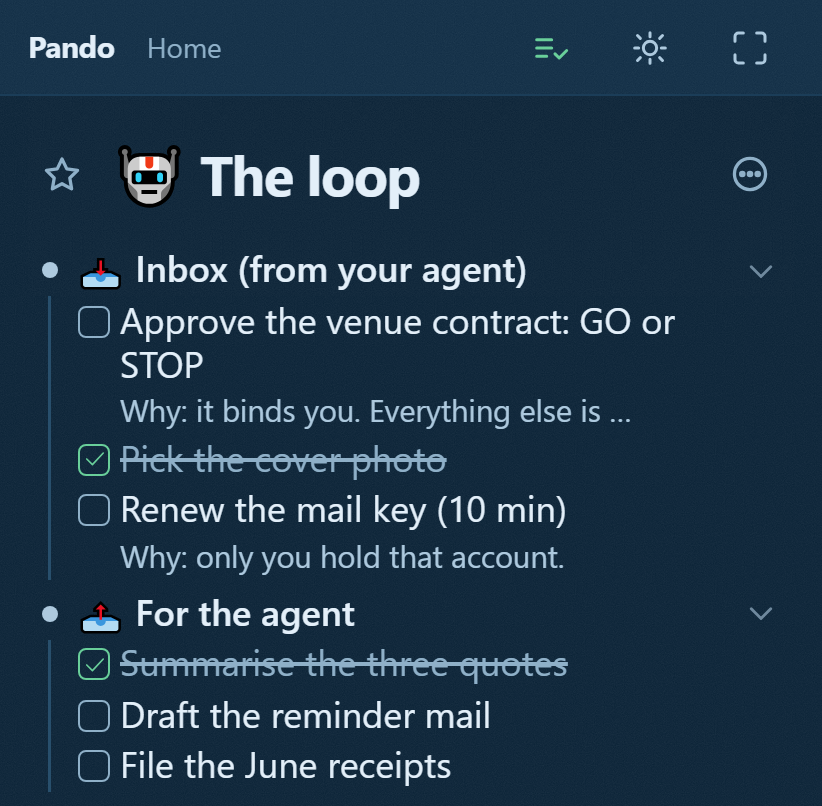
That is what the connection buys on a phone. The assistant files what only you can do as checkboxes, from wherever it can write (Claude on the phone, ChatGPT on the web), and you tick them on your phone, with no terminal anywhere in the loop. The inbox your agent writes for you is that pattern in full.
Keep the CLI where there is a terminal
Holmes is right about his own desk. If your assistant runs in a terminal, give it a CLI and count its tokens. If it runs in a browser tab or in your pocket, it needs a server somebody hosts.
Connect it to Pando with that one address, then open the inbox template, press "Show in my Pando", and tell your assistant to file its first ask there.
Every source here was read on 23 September 2026: six articles, the Hacker News threads under them, and OpenAI's and Anthropic's own documentation. Point counts are that day's, and they still move.